This month we were all about operational efficiency saving you time in messaging customers, managing employees, and staying on top of your inventory. Your time is your money. So be sure to take advantage of these features to save time in your day.
Save Time With Template Messages
Effective communication is vital to a high quality customer experience. However, it can be time consuming and frankly, repetitive. That’s why we’ve introduced templated messages.
Your top 3 most used customer messages (inspection, estimate, and invoice) can now be customized to fit your shop’s communication needs and voice. These are fully customizable and paired with the ability to create any other message template you’d like.
Who’s this for?: Customers on our Scale Tier with Tekmessage turned on.
Have employees that work across your multiple locations? Well, managing them just got easier. This month we put out two separate releases that allow you to seamlessly create, move between shops, and delete employees right from the MSO dashboard. No more hopping in and out of each shop’s profile.
Who’s this for?: Customers with our multi-shop add-on package.
Manage Inventory More Effectively With The Inventory Feed
Managing inventory effectively is crucial for shop operations. To help shops stay on top of pricing and quality changes we’ve introduced the Inventory Activity Feed. This will now automatically log stock orders, parts moved into inventory, and purchase order cost updates.
See Continuous Improvement of Our ALLDATA Integration
In August, we launched our ALLDATA integration, offering you yet another option for labor guide integration with Tekmetric’s shop management system. Since then, we’ve continued to improve it including the introduction of vehicle specification information and a search bar for easy navigation.
Who’s this for?: Customers on our Grow and Scale Tiers who integrate with the ALLDATA labor guide.
In the world of tires and engine diagnostics, the most powerful tool in your automotive shop might not be in your toolbox—it might be online. For the modern auto repair shop, a professional website is no longer a luxury; it’s a necessity. It’s your 24/7 receptionist, your most compelling advertisement, and your digital front door.
But where do you start? The world of web design can feel as complex as a modern car's electrical system. This guide will navigate you through the complexities of website building and best practices to drive customers to your shop.
Why a website is essential for mechanics
In an age where the first step to solving a problem is a Google search, your customers are looking for you online. When a check engine light flashes or brakes start to squeal, their phone is the first thing they reach for. If you’re not there to be found, you’re handing business to your competitors.
1. Building trust: A professional car repair website acts as a digital handshake. It tells visitors that you are a legitimate, trustworthy auto repair business.
2. 24/7 Marketing engine: Your shop has closing hours, but your website works around the clock. It provides essential information like your location, auto services, and phone number. You can even add online scheduling features so you never miss a customer when they are ready to book.
3. Local search and SEO: A well-optimized website is critical for local SEO optimization. When someone searches "car repair near me," search engines like Google prioritize businesses with informative and mobile-friendly websites. A strong online presence puts you at the top of those results, making you the default choice for local customers in need. More on SEO later.
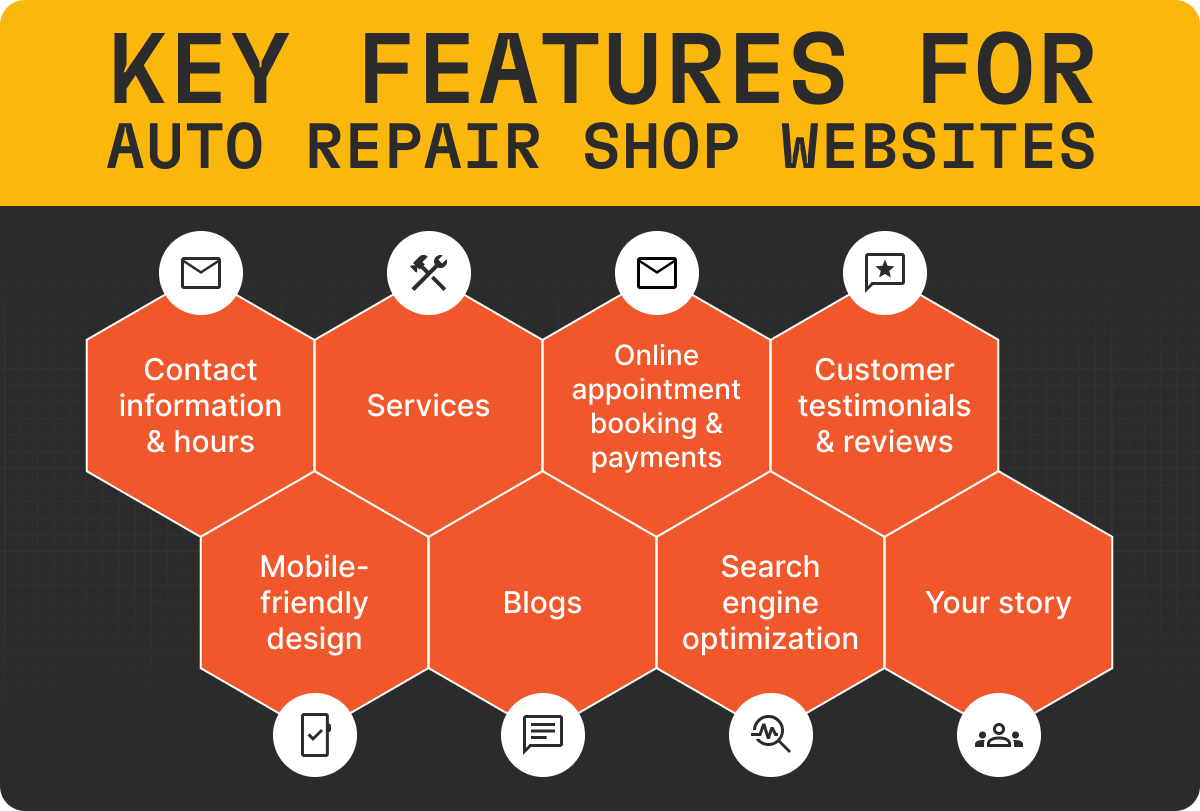
Key features for your auto repair shop website
To be effective, your mechanic website needs more than just a pretty face. It requires specific features and functionality to meet the needs of your customers.
1. Contact information and hours
Your phone number, address (with an embedded, clickable map), and business hours should be prominently visible on your homepage, preferably at the top and bottom of every page. A simple and memorable automotive shop name can also help you be easily remembered when the next check engine light comes on.
2. Add service pages
Don’t just say "we fix cars." Create distinct auto repair service webpages listing all of your car repair services: oil changes, brake repair, engine diagnostics, transmission services, tire rotation, auto care, etc. This not only informs customers but also provides valuable keywords for search engines and helps customers know if you perform the service they need. You can also include your prices if you think it is a selling point.
3. Online appointment scheduling and payments
Convenience is king. An integrated scheduling system that allows customers to select a service and schedule a time slot is a game-changer. It reduces phone tag, streamlines your workflow, and improves the overall customer experience.
Tek-Tip: Overwhelmed? Tired of boring website templates? Let Tekmetric build you a custom website that is tailored to your business. (Must be a Tekmetric customer).
4. Customer testimonials and reviews
Social proof is incredibly persuasive. A dedicated section for reviews from satisfied customers builds trust and validates your quality of work. An easy place to start is by managing and responding to your Google reviews.
5. Mobile-Friendly design
The majority of local searches happen on mobile phones rather than desktops. Your website must be optimized for mobile devices and fully responsive to provide the best user experience.
6. Blogs
Writing blogs about topics your customers care about can be an easy way to drive online engagement and new customers. Make your blogs specific to your geographical area such as “How to fix a flat tire in Houston, Texas” or “What to do when your check engine light comes on in Denver, Colorado”.
7. Search engine optimization
Stop what you are doing and search for your key automotive services in Google. Does your shop show up on the first page of Google? If not, you likely have an opportunity to optimize your SEO strategy and online presence.
8. Clear goals
Your website should make it easy for customers to contact you or to book an appointment. Whether you add a contact form or online booking functionality, make it easy for potential customers to start the process.
9. Your story
Is your shop veteran or family owned and operated? Sharing your story and what makes your shop unique can be a big selling factor for potential customers.
The best website builders for your shop
You don’t need to be a coding expert to build a website. Modern website builder platforms offer intuitive tools that make the process straightforward.
Tekmetric: If you are tired of boring website templates and are already a Tekmetric customer, Tekmetric will build you a custom website design that matches your brand and services. You can even add SEO support and online bookings so you can waste less time on marketing and spend more time with your customers. Best of all, everything syncs with your Tekmetric platform so everything stays in one place.
CAUTION: building your own website can be time consuming, expensive, and lead to poor results. Most website builders do not have automotive industry experience and may not know the best practices. Let Tekmetric build you a custom website that is tailored to your business. (Must be a Tekmetric customer).
Wix: If you want to invest the time and manpower to create your own website, Wix is known for its user-friendly drag-and-drop interface. It offers a wide selection of website templates, including many designed for the automotive industry.
Squarespace: Squarespace is another great option if you want to build your website yourself. Squarespace is known for its clean and modern website design templates.
Best auto repair website templates
Choosing a website design is about finding an aesthetic that reflects your brand and serves your customers' needs. Look for designs that are clean, professional, and easy to navigate. Here are a few of our favorite automotive websites:
The KARR website offers an engaging video on the home page paired with a bright aesthetic. It stands out to prospects with clear call-to-actions, customer testimonials, services, and contact information.
The Anderson website grabs your attention immediately with high-quality shop images with a minimalist aesthetic. We loved the easy to use online booking tool and embedded Google map for easy directions.
Hansen Auto Repair has done a great job making their website easy to navigate and incorporating clear call-to-actions. They added specific service level website pages to maximize SEO performance and even added coupons/warranty information. The theme is patriotic while also being professional.
The last website to make our list was an RV repair shop showcasing that all types of repair shops need a website to drive business. This website also stood out because they added a link to their merchandise store and helpful FAQs.
How to choose the right website design for your shop
With so many options, how do you pick the web design that's right for you?
Define your goals: What is the single most important action you want a visitor to take? Is it to call you? Book online? Visit your shop? Your entire design should guide them toward that goal.
Customer first: Are you serving busy parents who value convenience, or car enthusiasts who appreciate technical detail? Your design, from colors to fonts, should speak their language.
Brand identity: Your website is an extension of your physical car mechanic shop. If your shop is known for being modern and tech-forward, your website should reflect that. If you're a third-generation family business, your site should convey that heritage and trust.
Budget and resources: Consider both the initial cost and the long-term maintenance of the website.
Prioritize functionality: A beautiful website that is slow, confusing, or broken is worse than a simple website that works perfectly. Ensure the website template you choose is fast-loading and provides a seamless user-friendly experience for your visitors.
Final thoughts
Building a modern auto repair website is one of the single best investments you can make in the future of your automotive business. It establishes your credibility and works 24/7 to attract new clients.
Navigating the estimate and repair process starts with an automotive repair order form. And a manual process may create more work for your team. Your service advisors are trying to move everything along quickly and accurately, but they're human and mistakes do happen.
With a manual automotive repair order form process, it can be easy for service advisors to get lost in the hustle due to typos, illegible handwriting, or estimates saved in the wrong place.
You might also find that it’s difficult to guide your business with a manual estimate and repair order process because data collection can become an enormous challenge.
Using traditional automotive repair order forms is kind of like trying to navigate a road trip with a paper map: it can be easy to get lost in the process, and once you’re lost, it can be difficult to get back on track. Nowadays, paper maps are just one of our endless choices for navigation tools, and how many drivers still use them?
See how your shop stacks up against thousands of auto repair shops nationwide
You track your ARO. Maybe you watch your car count week over week. You know when a month is good and when it's below par.
But here's a question most shop owners can't answer quickly: Compared to shops like yours, are your numbers strong, average, or quietly underperforming?
There's a real difference between a number that's improving and a number that's competitive. A shop can grow ARO year over year and still be well below what high-performing shops are seeing in their market. Without an external reference point, you don't know which situation you're in.
That's the problem benchmarking solves, and it's the reason the data matters more than the direction.
Internal Tracking Tells You the Trend. Benchmarking Tells You the Truth.
Internal performance tracking is essential. If you don't know your ARO, car count, parts margin, and effective labor rate, you're managing without the most basic tools. But internal tracking has a structural limitation: it can only tell you how you're doing relative to your own history.
That's useful for spotting momentum — a rising ARO, a growing car count, tighter parts margin. What it can't tell you is whether your baseline is strong or weak relative to the market.
A shop with a $580 ARO that has grown from $520 over two years has made real progress. But if top-performing shops in their region are averaging significantly higher, that progress hasn't closed the competitive gap. It's just moved in the right direction.
The fix isn't to stop internal tracking. It's to add an external benchmark so you know what the target actually looks like.
Many shop owners get their benchmarks the informal way: conversations with peers at trade shows, numbers shared in coaching groups, or revenue figures posted in forums. These have real value, but they're also limited.
Self-reported numbers skew high (people share their wins). Peer groups are small samples. Industry averages from trade associations are often lagged and lack the granularity you need to compare fairly — a six-bay shop in a suburban market shouldn't be benchmarking against national averages that include dealership-adjacent shops in metro areas.
The more useful comparison is data drawn from shops operating in similar conditions, at similar scale, tracked in a consistent and anonymized way.
What Good Benchmarking Actually Looks Like
Effective benchmarking for an auto repair shop compares you on the four metrics that most directly drive profitability:
ARO: Are you getting full value from each car that comes through your door?
Car count: Is your volume where it needs to be to support your revenue goals?
Parts margin: Are you protecting margin as supplier costs fluctuate?
Effective labor rate: Is your real revenue per labor hour aligned with your posted rate?
Each of these metrics has a different lever. If your ARO is lagging, the fix usually involves inspection completion rates or customer communication. If your car count is stagnant, the issue is typically acquisition or retention. If your parts margin is eroding, your pricing matrix needs a look. If your effective labor rate is low, it's often a discounting or packaging problem.
Benchmarking tells you which problem to solve first. That's valuable when you have limited time and you're trying to prioritize.
How the Tekmetric Shop Index Works
The Tekmetric Shop Index is a free benchmarking tool built from data collected across more than 12,000 auto repair shops. Enter your shop's metrics and get an instant comparison showing where you stand on each of the four key measures. No Tekmetric account is required. Anyone can use it.
The output isn't a vague grade — it shows you where each metric ranks and gives you a clear picture of where the gap is largest. That's the signal that tells you where to focus first.
The benchmarking data is the starting point, not the finish line. Once you know which metric is your biggest gap, you can start asking the right questions:
If ARO is lagging: How consistently are your technicians completing and sending digital vehicle inspections (DVIs)? Are customers seeing and approving the recommended work?
If car count is flat: Are you actively pursuing new customers? Are return visit intervals optimized? Are declined jobs being followed up?
If parts margin is soft: When did you last review your parts pricing matrix? Is it adjusting for recent cost increases from your vendors?
If the effective labor rate is low: Are service writers building jobs accurately? Are discounts being applied consistently or inconsistently?
Each of these questions points toward a workflow, and Tekmetric's reporting is built to surface the answers at the job, technician, and service writer level. But even before you get to that step, knowing which question to ask is most of the work.
High-performing shops don't treat benchmarking as a one-time exercise. They check their rankings periodically, track how their numbers shift against the industry baseline, and use the comparison to coach their teams with context.
"You're at 85% DVI completion" is a data point. "You're at 85% completion, and top shops are at 95%" is a coaching conversation with direction.
"Seeing them take the shift to Tekmetric and then grow profitability in the same four walls has been phenomenal. Some of them are just exponential." — Matt Schwab, Clutch Automotive, Tekmetric Customer
Takeaways
Internal tracking shows you direction; benchmarking shows you position.
The four metrics — ARO, car count, parts margin, effective labor rate — are the right comparison points.
Good benchmarking data is consistent, anonymized, and drawn from shops with similar operating profiles.
The TSI tool is free, built from more than 12,000 shops, and gives you an instant read on where your gaps are largest.
Your benchmark result tells you which lever to pull first — and that's where the work starts.
Once you know your gaps, the next step is building a system to close them.


.png)
.png)


.svg)



.svg)

.svg)
.svg)
.svg)
.svg)
.svg)
.svg)
