blog

Welcome to the Tekmetric Blog

Thoughts, perspectives, and industry commentary from the Tekmetric team

What Your Service Advisors, Technicians, and Managers Actually Need to See in a Shop Management System

read more

Role-based visibility means each person in your shop sees the numbers and screens their job actually requires, and not the ones it doesn’t. A technician sees their job queue, their assignments, and their hours. A service advisor sees the estimates, inspections, and customers in front of them today. A store manager sees one whole shop. An owner sees the whole portfolio.

Most multi-location operators get this half right. They are careful about what people can do and less careful about what people can see.

Visibility is not the same as permission

Permissions answer a question about authority: who can apply a discount, who can unpost a repair order, who can change a labor rate. That is worth getting right, and it gets harder with every location you add.

Visibility answers something different: whose attention is this number worth?

You can get every permission toggle exactly right and still hand all four roles the same crowded screen. Nobody's data is at risk in that setup, but everybody's attention and time is at stake.

One test that sorts almost every case

Ask this about any number, report, or screen: can this person affect the outcome and improve the bottom line?

If yes, they should see it daily, and without having to ask anyone for it. If not, showing it does not create accountability. It creates noise, and eventually the habit of ignoring the screen altogether. A technician staring at portfolio gross profit is not empowered. They are distracted from the numbers they own.

Run that test role by role to discover whether your employees have the right information in front of them.

__wf_reserved_inherit

What each role needs to see

Technicians

Needs: their job queue and assignments, hours logged against each job compared with the labor guide, parts status on jobs they are about to start, and the inspection findings they documented.

Doesn't need: portfolio revenue, shop-level gross profit, and another technician's hours or pay.

A technician's ability to make an impact on the shop's bottom line is entirely on the car in front of them. Hours and parts availability are the two things they control, and parts is the one operators most often overlook — a technician who can't see whether a part is on the shelf starts jobs they can't finish.

"It's also great to be able to see approved work and hours, and it helps us keep track of our hours efficiently."
-Anecia Lewis, Tekmetric G2 review

Service advisors

Needs: the full job board for today, inspection results the moment the technician finishes them, complete customer history including declined work, and their own close ratio.

Doesn't need: other locations' performance, portfolio-level financials, and payroll.

Close ratio is the one to sit with. It is the number advisors most directly control, and the one most of them have never been shown. An advisor who doesn't know their own close ratio has no way to tell a slow week from a presentation problem.

Advisors also need one view that reaches past their own role: the technician job board. Not to manage technicians, but to route work.

"Another feature I value is the ability to view the job board for technicians, which lets me plan more effectively and assign vehicles to technicians who could use additional hours."
-Verified service advisor, Tekmetric G2 review

Store managers

Needs: their shop, completely, including car count, ARO, close ratio by advisor, technician efficiency, work-in-progress aging, discounts applied, and end-of-day reconciliation.

Doesn't need: the other locations, unless comparing locations is genuinely part of the job.

This is the one most operators get backwards. Portfolio visibility feels like a gesture of trust, and it quietly changes the conversation: a manager judged on one shop who can see five shops will start explaining their own numbers by pointing at somebody else's. Give a manager the shop they are accountable for, and the discussion stays on their side of the desk.

Multi-location owners and ops leaders

Needs: the spread. Every location side by side on the same metrics, with the ability to drill into one shop, one advisor, or one date range when something looks off.

Doesn't need: individual repair orders, most days.

The temptation at this level is to use full access to go back to running a shop. Owners should assess the gap between their best location and the worst one — a rising portfolio average can hide one store sliding backward.

Owners who have done this describe the payoff in ordinary terms:

"Everything is online — I can work from home or at any of the terminals at any shop. I am able to set up different levels of access depending on the employee's position."
-Verified multi-shop owner, Tekmetric G2 review

Both ways to get it wrong

Too much visibility costs you attention and, at the edges, discretion. Picture a technician scrolling past their own approved hours to reach a portfolio gross profit figure they can't act on, next to payroll data they were never meant to see. A screen that should have taken four seconds to read took 40, and the habit of skimming past it starts that day.

Too little costs you speed, and it costs more than operators expect. Advisors wait on approvals for information they should already have. Managers can't make a call on their own shop without phoning the owner. And technicians start work they cannot finish:

"Technicians can simply see if all parts are now in inventory or if we are waiting on them, keeping them from wasting time starting a job we're not ready for."
-George, verified user, Tekmetric G2 review

How Tekmetric scopes visibility by role

Tekmetric is an all-in-one auto repair platform, allowing multi-shop auto repair operators to configure role and visibility together rather than as two separate projects.

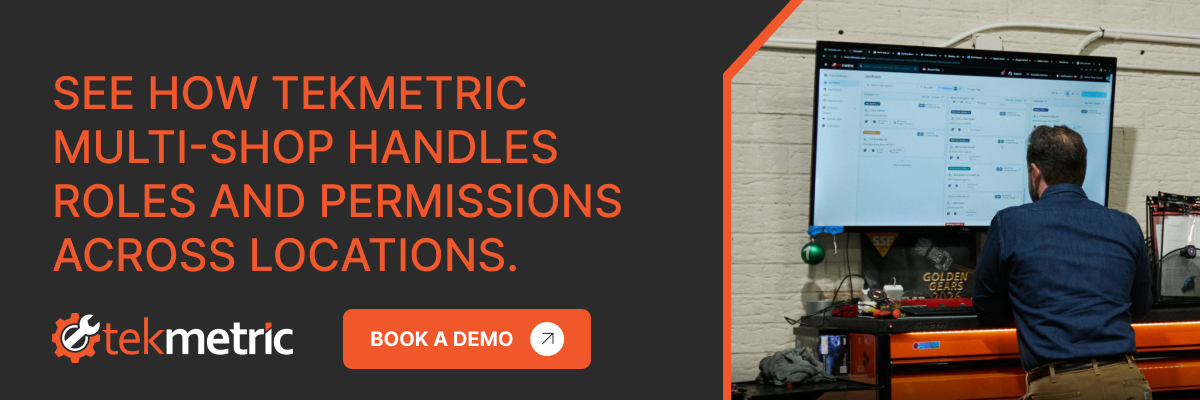
New employees start from a default role — owner, manager, service advisor, or technician — each with granular permissions you can adjust, set up once and applied consistently at every location. Technicians see their job queue, their assignments, and their hours. Advisors build estimates, communicate with customers in front of them, and take payment. Managers get what they need to run their shop without touching another location's data. Owners see the full portfolio in real time from a single login.

The Job Board is where the advisor's view lives, sorting active work into estimates, work-in-progress, and completed. The Tech Board gives advisors and managers a live read on every job by technician, with status and labor hours, while technicians update status from their own device instead of walking to the front desk.

At the portfolio level, one dashboard carries ARO, car count, close ratio, gross profit, and technician efficiency for every location, filterable by shop, advisor, and date range. That filtering is what makes the same dashboard work for two different jobs: the portfolio view for an owner, one store for the person running it.

"The amount of information that is available to the front desk, the service advisor, and the technician at a glance is very impressive, and the functionality of it together is great."
-Moises M., guest service representative, Tekmetric G2 review
__wf_reserved_inherit

The takeaways

Getting this right is unglamorous configuration work that pays out as speed. Here are three things to do with it:

  • Run the test on every role you have. For each number on their screen, ask whether that person can change it.
  • Give each role their own scope by default. Don't overload roles with information or data. Provide what they need and can impact.
  • Show your advisors their close ratio and your technicians their hours. Those are the two role-level numbers with the most direct line to ARO, and they are the two most often left switched off.

Then get out of the way and let each person look at the thing they can actually fix.

browse the latest articles

All tags
Thank you! Your submission has been received!
Oops! Something went wrong while submitting the form.

Tekmetric at SEMA 2026: Your Guide to the Show and Booth 11847

October 15, 2026

Read time: 3 min

read more

Tekmetric is coming to SEMA 2026, and we're building something big.

From Nov. 3-6, 2026, our team will be in the North Hall at Booth 11847 featuring the all-in-one auto repair platform trusted by more than 16,000 shops. We're bringing live demos, hands-on benchmarking, announcing new products, a timed brick-building competition with prizes, and one big build we can't talk about just yet.

I've been to a lot of show floors, and the shop owners who get the most out of SEMA don't try to see everything. They show up knowing what they need and where to find it, so consider this your map to everything Tekmetric at SEMA.

SEMA 2026 fast facts

  • When: Nov. 3-6, 2026
  • Where: Las Vegas Convention Center, 3150 Paradise Road, Las Vegas
  • Tekmetric: Booth 11847, North Hall
  • Who can attend: The show is trade-only. Friday, Nov. 6, is the only day open to the general public.
  • Education: More than 99 free professional education sessions run during the week.
  • Can't make it? See what we have planned for SEMA.

Why we're at SEMA

SEMA is the biggest week of the year for the automotive aftermarket, and it reaches far beyond the service bay. Parts manufacturers, tool and lift makers, tire and wheel brands, audio and electronics suppliers, collision and refinish specialists, truck and off-road builders, and racing teams all share one campus for four days. More than 2,000 exhibitors debut thousands of products, and the builds in the aisles make you stop walking. It's one of the biggest stages in the world for anything with an engine.

Tekmetric is one piece of that picture. Auto repair technology is a small corner of a very large industry, but the shops that run on it sit at the center of it. Every part, tire, and tool on that floor eventually lands in a bay, on a lift, and on a repair order. Our customers and partners are there, and so are the shop owners, service advisors, and technicians who haven't met us yet. The energy and the connections are why we come, and this year we're bringing more than we ever have.

Build your plan, brick by brick

Decide what you need before you land. Whether it's new equipment, a better front counter, or an honest read on how your shop compares to others, write it down and build your route around it.

Know the halls. SEMA fills the Las Vegas Convention Center campus, and the floor is organized into 14 product categories across five hall sections. Knowing which hall holds what saves miles on your feet:

  • West Hall: Trucks, SUVs, and Off-Road; Powersports, Side-by-Side, and Lifestyle (new for 2026); Restyling and Car Care Accessories
  • North Hall: Business Services (that's us); Mobile Electronics and Technology; Restyling and Trucks
  • Central Hall: Racing and Performance; Hot Rod Alley; Restoration Marketplace
  • South Hall Upper: Tools and Equipment; Collision Repair and Refinish
  • South Hall Lower: Global Tire Expo powered by TIA; Wheels and Accessories; New Products Showcase

For most repair shop owners, South Hall Upper (lifts, tools, and equipment), South Hall Lower (tires), and North Hall (business services) cover the most ground. Start there and branch out.

Bring your numbers. Know your average repair order, car count, parts margin, and effective labor rate, because every vendor conversation gets sharper when you can talk specifics. At our booth, those four numbers unlock something worth your time, and we'll get to that below.

Leave room between stops. The campus is large and the days are long, so buffer time lets you follow a good conversation instead of cutting it short.

Wear comfortable shoes. It's the same advice every year, and it's still true.

What's waiting for you at Booth 11847

Our theme this year is building shop results, brick by brick, and every station in the booth answers one question: What does this do for my shop?

See how your shop stacks up

Run your numbers through the Tekmetric Shop Index and see how your ARO, car count, parts margin, and effective labor rate compare to thousands of shops nationwide. It takes about two minutes, and you walk away knowing exactly where you stand. Your benchmark also enters you to win a $1,000 gift card.

Watch the platform work

Our booth is set up around three stations that match how a shop actually runs:

  • Run Your Shop. Repair orders, digital vehicle inspections, scheduling, and real-time reporting in one place.
  • Secure Payments. Built-in payment processing, including Buy Now, Pay Later options that help customers say yes to the full estimate.
  • Engage Customers. Two-way texting, review management, digital advertising, and marketing tools that keep your bays full between visits.

Each station is one piece, and together they're the whole platform. Bring a question about your own shop and we'll answer it with a real-world example.

But this year, we also have something new to show you.

Are you one of the 51% of shops that has to send vehicles to the dealership because you can't find the repair data you need? Or did you know the average shop misses 166 calls a month? Or that the average DVI takes 30 minutes?

At SEMA, we're showing you what we're doing about all three, before anyone else sees it.

Compete in the Brick by Brick Build Off

It's the only build at SEMA that fits in your carry-on. Grab a bin of toy bricks and race the clock against three other builders in a seven-minute competition. A new round starts about every 10 minutes — just listen for the horn honk that opens and closes each round.

Build a car, a truck, a boat, or whatever you have in mind. Our team judges every entry, and the day's top builds go on display with your name, city, and shop. One winner each day takes home a LEGO car set: a 1960 Shelby Cobra 427 S/C, a Dodge Charger R/T, a Ford Model T, or a Lamborghini Revuelto.

We are bringing something big

We've been working on something for months, and we can't share the details yet. We'll just say it's life-size, it's made of bricks, and the horn works, so come see it in person.

Tektonic 2027

Tektonic is our annual industry conference, built for shop owners, service advisors, and technicians who want to run better shops. Stop by to hear what's planned for 2027 and how to be part of it.

Canadian shops: Join us at AIA Canada Night

Tekmetric is a sponsor of AIA Canada Night during SEMA week. If you run a shop in Canada, come meet our team from 5:30-8:30 p.m. Tuesday, Nov. 3, at HaSalon inside The Venetian Resort Las Vegas, 3355 S. Las Vegas Blvd. Canada Night is a ticketed, trade-only event, so secure your spot through AIA Canada.

Beyond the booth

Once you've found us, the rest of SEMA is worth your time, too. The tools and equipment halls show you what's coming to your bays before it hits a catalog, and the free education sessions cover shop management, marketing, and technical training. The conversations with other shop owners are often the best part of the week.

See you in Las Vegas

You won't see all of SEMA, and that was never the goal. The best weeks end with one idea you put to work the Monday you get back. Make Booth 11847 one of your stops to run your numbers, build something, and meet the team behind the platform. We'll be in the North Hall, brick by brick.

Want the full rundown before you go? See what we have planned for SEMA.

No items found.

Role-Based Access in Auto Repair Software: Why It's Critical for Multiple Locations

October 13, 2026

Read time: 3 min

read more

Role-based access is the ability to control what each employee can see and do in your shop management software based on the job they hold. A technician clocks into jobs and completes inspections. A service advisor builds estimates, sells work, and takes payment. An owner sees the money. Each person gets what the job requires and nothing beyond it.

At one location, you can run loose. You are in the building. You hear the conversation at the front counter, you notice the discount before it posts, and you can walk 20 feet to correct something. Permissions are a convenience.

At three locations, they become the only way a standard survives when you are not there to enforce it.

What role-based access actually means in a shop management system

Two ideas sit underneath the term, and they are worth separating because vendors use them interchangeably.

A role is a job function with a default bundle of access attached. Roles are defined by titles like owner, manager, service advisor, and technician. It is the starting point when you create an employee.

A permission is a single switch that determines if someone can post a repair order, export a customer list, edit a labor rate, and refund a payment.

A system with roles but no granular permissions forces you into whoever the vendor decided a "technician" is. A system with granular permissions but no way to save a configuration forces you to rebuild that configuration by hand for every new hire. What you want is both — job-level roles you can adjust, and the ability to save the adjusted version and reuse it.

That last part is where most operators get stuck, and what breaks at scale.

__wf_reserved_inherit

What changes when you go from one shop to many

Three things shift, and they compound.

You stop being in the building

This is the obvious one and still the most underrated. Presence is a control system. Remove it and you need something to take its place.

"Now I can look at everybody at a glance. I can be in a different state, different city and know exactly what's going on in each location all the time. That's not something I had before."
— Leroy Ingram, Ooroo Auto Care (MSO)

Visibility is half of it. The other half is deciding, in advance, what each person is able to do when nobody is watching.

Every standard you set needs something holding it in place

Multi-shop operators spend real effort standardizing digital vehicle inspection templates, canned jobs, the labor matrix, and discount policies. Then they hand that standard to 20 people across five buildings and hope.

Permissions are what turn a policy into a setting. If only a manager can apply a discount above a set dollar threshold, the policy holds by default instead of by memory. If only two people at each store can unpost a repair order, your month-end numbers stay clean.

Auditing turns into a job nobody has time for

At one shop with six employees, you can check everyone's access in 10 minutes. At six shops with 60 employees, you cannot.

This is where some multi-shop operators fail. It is not that operators set permissions badly. It is that they set them once, correctly, and then never look again. Six months and four hires later, nobody can tell you who has access to what.

The permissions that carry the most risk across locations

If you are evaluating software, these are the specific controls worth asking a vendor to show you in a demo.

  • Discount and pricing authority. Who can apply a discount? Who can change a labor rate or a pricing matrix? Every dollar discounted comes off the repair order total, which means it comes off both your average repair order (ARO) and your gross profit.
  • Posting and unposting repair orders. Posting finalizes the repair order and creates the accounting entries. Unposting reverses it. You want the second one narrow: enough people to fix a genuine error, not enough to make your reporting unreliable.
  • Employee and permissions management. Who can grant access is a separate question from who can edit an employee record. A system that treats them as one switch is giving away more than you think.
  • Reporting visibility. A store manager should see their store. Not everyone needs the portfolio view.
  • Customer export. The ability to download your customer list is the ability to walk out with it.
  • Payments and accounts receivable. Anything that moves money after the fact, including open balances on fleet and credit accounts.
  • Audit visibility. Login History shows who accessed the platform and when. The Inventory Activity Feed shows who changed what in parts. Permissions tell you what someone can do. Audit trails tell you what they did.

How to set this up before you open the next location

  • Write the roles down before you touch the software. List every job title you actually have, not the four the software ships with. Master technician and apprentice are different jobs. So are store managers and service advisors.
  • Build them as reusable groups, not one-off profiles. If you are adjusting permissions employee by employee after the fact, you have built something you cannot maintain and cannot audit.
  • Decide what cross-location access means. Most people need one store. A handful need several. A very small number need everything. Be deliberate about which is which.
  • Set the exception path. Someone will need something they do not have, at 4 p.m. on a Friday. Decide now who grants it and whether it gets reversed.
  • Put a quarterly review on the calendar. Access drifts. Roles change, people move stores, someone gets covered for a week and keeps the access.

How Tekmetric handles role-based access across locations

Tekmetric is an all-in-one auto repair platform, and employee access is managed in one place rather than shop by shop.

New employees start from a default role — admin, service advisor, or technician — each with its own permission set. From there you can either adjust individual permissions or assign a saved permission group, so a master technician and a junior technician can carry genuinely different access without either being configured from scratch.

For operators running more than one location, the setup happens once. You create the employee in the Tekmetric Multi-Shop dashboard, choose their role and permissions, and select which shops they belong to. You also can see every employee in the organization in one list, including which shops each person is in and what their role is at each.

Organization owners set a separate level of Multi-Shop access on top of shop-level permissions, which is how you give a regional lead the portfolio view while a store manager keeps a store view. And because every permission change is logged with who made it, what changed, and when, the quarterly audit stops being an archaeology project.

"I've gone from doing the transaction to running the store to now have a team of ops guys that run the stores."
— Matt Schwab, Clutch Automotive (MSO)

That progression is the whole point. Delegation is not a personality trait, it is an infrastructure question. You can only hand a store to somebody once the system can define what they are handing back.

__wf_reserved_inherit

The takeaway

Role-based access is unglamorous, and it is the difference between an operator who has five successful shops and an operator who has five struggling shops. Set the roles before you need them. Build them as groups you can reuse. Look at them again every quarter.

Then you are free to go somewhere else and still trust that the standard is still holding.

No items found.

Reading the ARO Gaps Among Your Shops

September 8, 2026

Read time: 3 min

read more

Your locations don't have an ARO problem. They have a consistency issue.

If you run more than one shop, you have a number you probably don't look at often enough: the distance between your highest-ARO location and your lowest. That spread isn't a meaningless number. It's a diagnosis — and it's usually pointing at something you can fix this quarter.

Seeing one shop consistently post a higher average repair order (ARO) — the average dollar amount per repair order — while another lags behind, month after month, tells you something useful and fixable — that the two shops aren't actually running the same playbook.

When identified, an ARO gap points directly at where revenue is leaking and which location can improve its bottom line. Here's how to read it, and how to close that gap.

What ARO by location actually measures

ARO is your total sales divided by your car count. On its own, a single shop's ARO tells you how much revenue you capture per vehicle. Compared across locations, ARO becomes a relative measure. It shows you which shops are upselling the customers they already have, and which ones are letting opportunities walk out the door.

That distinction matters because car count and ARO are different levers. A location can be busy and still underperform on ARO. When two of your shops see roughly the same number of vehicles but post meaningfully different ARO, the busier-but-lower shop isn't short on demand — it's short on execution somewhere between check-in and checkout.

Why the same brand produces different numbers

When you standardize on one brand, one sign, and one set of prices, you'd expect performance to converge. It usually doesn't, and the reasons tend to fall into three buckets.

1. Inspections aren't consistent

The digital vehicle inspection is where most ARO is won or lost. A location that completes thorough inspections on nearly every car — with photos and clear findings — surfaces more legitimate work and gives customers a reason to say yes. A location that treats the DVI as optional, or rushes it, never puts that work in front of the customer in the first place. Shops that consistently attach more photos and findings to their inspections tend to post a higher ARO than shops that don't, because customers can see the work rather than just hear about it.

2. Estimating and pricing drift shop to shop

If one location prices a job from an up-to-date matrix and another builds estimates by memory or old habits, you'll see the difference in ARO. The same brake job, quoted two ways, produces two different repair orders. Multiply that across every ticket, every day, at every location, and small pricing inconsistencies become a large revenue gap.

3. Workflow and presentation vary by advisor

How work gets presented — whether declined jobs are captured for follow-up, if good/better/best options are offered, and the customer sees the inspection before the phone call — all of it moves ARO. When those steps live in one advisor's head instead of in a standard workflow, they leave when that advisor does.

How to compare ARO across multiple locations

A useful ARO comparison starts with removing the excuses you can measure. Before you conclude a location is simply in a weaker market, line the shops up on the metrics that feed ARO. When you compare ARO across multiple locations, look at five things:

What to compare across locations

  • Inspection completion rate: what percentage of cars get a full digital vehicle inspection (DVI) at each location.
  • Photos and findings per inspection: whether the shop shows customers the work or just describes it to them.
  • Close ratio: of the work presented, how much the customer approves.
  • Declined jobs recovered: whether declined work is followed up over time or lost.
  • Real-time reporting: whether you can see all of the above per location, side by side, without building a spreadsheet.

Those five inputs are what separate a high-ARO location from a low-ARO one. Walk them in order, per shop:

  • Inspection completion rate — what percentage of cars actually get a full DVI at each location?
  • Photos and findings per inspection — is the low-ARO shop showing customers the work, or just telling them about it?
  • Close ratio — of the work presented, how much gets approved? A low close ratio points at presentation, not demand.
  • Declined jobs — is the shop recovering declined work over time, or letting it disappear?

When you put those side by side, the ARO gap almost always resolves into a specific, coachable behavior at a specific location — not a vague "that store just isn't as good." The lowest-ARO shop with the weakest inspection numbers is usually your single, fastest opportunity because you're not trying to create demand — you're converting cars you already have.

You can't coach a gap you can't see

The hard part for most multi-shop operators isn't knowing that consistency matters — it's seeing the gap in the first place. When each location's numbers live in a separate system, a spreadsheet, or a manager's weekly recap, the comparison is always late and never quite apples-to-apples. By the time you notice a location has slipped, you've lost a quarter.

This is where running every shop on one platform changes the math. Tekmetric gives multi-shop operators multi-location control and real-time visibility: a portfolio-wide dashboard and shop-level reporting that track revenue, ARO, car count, and technician productivity across multiple locations at once. Instead of assembling the picture after the fact, you can see which location is drifting while there's still time to coach it.

"Now I can look at everybody at a glance. I can be in a different state, different city and know exactly what's going on in each location all the time. That's not something I had before."
— Leroy Ingram, Ooroo Auto Care (MSO)

Visibility is only half of it. The same platform lets you standardize the inputs that drive ARO — DVIs, canned and Smart Jobs, pricing matrices, and discounts — across every shop, so your best location's playbook becomes every location's default rather than a secret one store happens to know.

"Seeing [a newly acquired shop] take the shift from what they've always used to Tekmetric and then grow profitability in the same four walls has been phenomenal. Some of them are just exponential."
— Matt Schwab, Clutch Automotive (MSO)

Turning the gap into a plan

Once you can see the gap and its causes, closing it is a matter of focus. A few takeaways:

  • Start with your lowest-ARO, lowest-inspection location. It's the biggest lever to pull and the fastest move to make because the demand is already there.
  • Fix one input at a time. Get DVI completion up first; inconsistent inspections are the most common root cause of a lagging ARO.
  • Make your best shop the template. Standardize its workflows, pricing, and inspection process, then apply them everywhere instead of hoping each store reinvents them.
  • Watch the gap, not just the average. A rising portfolio average can hide one location sliding backward. The spread between best and worst is the number that tells you whether your standards are actually holding.

The gaps among your best and worst shops isn't a verdict on your locations. It's a map. It shows you exactly where the next dollar of ARO is hiding.

See the gap across every location

Tekmetric gives multi-shop operators multi-location control and real-time visibility into ARO, car count, and productivity across every store — plus the standardized workflows to close the gap.

Want to see where your shops stand first? The free Tekmetric Shop Index benchmarks your ARO, car count, parts margin, and effective labor rate against thousands of shops nationwide — no account required.

How to Deliver a Consistent Auto Repair Customer Experience Across Every Location

September 1, 2026

Read time: 3 min

read more

A customer trusts your shop. They've been coming for years. They know the waiting room. They trust the advisor who always explains things clearly. They never worry about the estimate.

Then they move across town, stop into your newest location, and it is a different experience altogether. The inspection isn't the same. There are pricing discrepancies among shops. And, perhaps worst of all, an advisor might have no idea they're dealing with a loyal customer.

That's the hidden cost of growth. Every location that is added is another chance for the customer experience to shift, and customers notice changes fast. For multi-shop operators, a consistent customer experience isn't a branding nicety. It's the thing that lets a customer trust the name on the building instead of the people inside it.

Consistency for customers: A consistent customer experience across locations means every shop delivers the same inspection process, pricing logic, communication, and recognition of a returning customer, regardless of which location they visit. It's achieved by standardizing workflows and centralizing customer data on one platform, rather than relying on each location to run things its own way.

Why consistency gets harder with every location you add

At one shop, consistency is almost automatic. You set the tone, you know the regulars, and your team absorbs your standards by working next to you. None of that scales. At three or five or 10 locations, the owner can't be everywhere, tribal knowledge doesn't transfer, and each shop starts developing its own way of doing things.

The drift is rarely dramatic. It's a technician at one location skipping a courtesy inspection step. It's one advisor quoting brakes $40 higher than another. It's a returning customer being treated like a stranger because their history lives at a different store. Individually small. Collectively, they add up to customers who can't predict what they'll get, and unpredictability is the opposite of trust.

The four places customer experience breaks first

When experience drifts across locations, it almost always starts in the same four places. Fix these and you've fixed most of the problem.

1. The inspection

The digital vehicle inspection (DVI) is where customers form their opinion of your shop. It's the moment they see what's wrong with photos and video instead of taking your word for it. If one location runs a thorough inspection with images and another does a quick once-over, customers get two completely different impressions of how careful your brand is. Standardizing the inspection is the single highest-leverage consistency move a multi-shop operator (MSO) can make. See how a strong DVI strategy drives approvals and trust.

2. Pricing and the menu of jobs

Nothing erodes trust faster than a customer discovering the same repair costs more at one of your locations than another. When labor rates, parts pricing, and common ("canned") jobs are set independently at each shop, that gap is inevitable. Consistent pricing logic across locations keeps a customer from feeling penalized for walking into the wrong door.

3. Customer history and recognition

Customers expect the businesses they frequent to remember them. Every major retailer can see what you bought and where, no matter which store you walk into. Auto repair customers have the same expectation now. If a loyal customer's records are trapped at the location where they were created, your newest shop can't see the declined brake job from last spring or the maintenance that's now due. Shared history is what lets any location pick up the relationship where the last one left off. Learn how Shared Customer History works.

4. Communication

How you reach customers, texts for approvals, inspection links, status updates, sets the tone for the whole visit. If one location texts photos and estimates within minutes and another still calls and describes problems over the phone, customers experience two different service standards under one brand. Consistent communication templates and channels keep the voice of your business the same everywhere.

How multi-shop software makes consistency the default

Here's the shift: consistency shouldn't depend on every location choosing to do the right thing. It should be built into the system they all work in. That's what a true multi-shop platform does. It turns your standards into settings, so the right way is simply the way the software works.

With Tekmetric Multi-Shop, operators standardize DVIs, canned jobs, pricing, and discounts across every location from one place, so a repair order opened at any shop starts from the same playbook.

Shared Customer History connects customers across shops, so any location can view a customer's full history, declined jobs, past service, contact info, without re-entering it or treating them like a first-timer.

And because everything runs on one login with a portfolio-wide dashboard, owners see how each location is actually performing in real time, not just revenue, but the operational habits that shape the customer experience. When a location starts to drift, you can see it and coach it before customers feel it.

Why it matters: Standardization isn't about making every shop identical for its own sake. It's about making a promise to customers, the same care, the same clarity, the same recognition, that holds no matter which of your locations they choose. That promise is what turns multiple shops into one trusted brand.

What it looks like when it works

Leroy Ingram, who runs Ooroo Auto Care, put the visibility side of it plainly:

"Now I can look at everybody at a glance. I can be in a different state, different city and know exactly what's going on in each location all the time. That's not something I had before."
— Leroy Ingram, Ooroo Auto Care

That's the operational backbone of consistency: when an owner can see every location clearly, standards stop being a hope and start being something you can actually manage.

Where to start

You don't have to fix everything at once. If you're feeling the drift, start with the highest-impact standard and work down.

  • Standardize your inspection first. Set one default DVI template so every vehicle at every location gets the same thorough treatment.
  • Align pricing and canned jobs so the same repair costs the same across shops.
  • Connect customer history so any location can recognize and serve a returning customer.
  • Standardize communication so approvals, estimates, and updates feel the same everywhere.

Do those four things and you'll close most of the customer experience gaps between your best location and your newest one.

Auto Repair Platform Features that Actually Matter

August 25, 2026

Read time: 3 min

read more

The most important features in auto repair shop management software are the ones that connect your business end-to-end: repair orders and estimates, digital vehicle inspections, parts ordering and inventory, integrated payments, and real-time reporting. If a system does those five things well, and keeps them in one place instead of five, it will vastly improve how your shop runs.

The hard part isn't finding software with a long feature list. It's telling the difference between features that move the needle in your bays and features that just look good in a sales demo. This guide breaks down the categories that matter, what each one actually does for your shop, and what to look for when you compare options.

1. Repair Orders and Estimates That Flow Together

What it is: The digital repair order (RO) is the backbone of the shop management system. Estimates should build fast — pulling in labor times and parts — and flow directly into the RO without rekeying anything.

Why it matters: This is where most of your team's wasted time hides. When an estimate becomes an RO in one click, and job templates drop in common parts and labor automatically, a service advisor can build a ticket in a fraction of the time. Over a full day of ROs, that adds up.

What to look for: Pre-built job templates, labor guide integration, and a clean estimate-to-authorization path. In Tekmetric, Smart Jobs allow advisers to build ROs from templates with parts and labor already attached, and estimates flow straight into the repair order.

2. Digital Vehicle Inspections (DVIs)

What it is: A digital inspection lets technicians document findings with photos and videos from a phone or tablet and send them straight to the customer.

Why it matters: Customers approve work they can see. A photo of a worn brake pad does more to earn trust — and a yes — than a line item on a paper estimate. That trust is what lifts approval rates and average repair order value, and it's why DVIs are one of the few features worth treating as non-negotiable.

What to look for: Photo and video capture, quick send-to-customer, and digital authorization built into the same flow. Tekmetric shops have reported meaningful ARO gains from strong DVI use, with ARO value rising from a $612 baseline to $741 for shops that use DVIs consistently.

3. Parts Ordering and Inventory

What it is: Parts management covers two things: knowing what's on your shelf, and ordering what isn't — ideally without leaving the repair order.

Why it matters: Parts are where margin quietly leaks out of a shop. Wrong parts, duplicate orders, and time lost bouncing among supplier tabs all cost money. When ordering is built into the RO and inventory updates as parts are used, your team stays in one screen and your margins stay protected.

What to look for: Integrated ordering through the supplier networks you already use, real-time stock visibility, and a parts matrix to keep pricing consistent. Tekmetric connects to parts suppliers so technicians can order parts as they diagnose issues.

4. Integrated Payments

What it is: Payments that live inside the shop management system, so checkout, reconciliation, and reporting all run off the same data.

Why it matters: A faster checkout is a better customer experience, and integrated payments mean you're not hand-matching a separate processor's statements at the end of the day. Options like text-to-pay and financing also help customers say yes to bigger jobs.

What to look for: Card and digital wallet acceptance, Text-to-Pay, built-in reconciliation, and financing options — all reporting into one place. In Tekmetric, payments are a built-in add-on rather than bolted on. There is no separate terminal, no third-party login, and no support ticket when something does not sync. Refunds, disputes, and deposits are handled in the same platform shops use to run repair orders.

Tekmetric customers have access to all of this: Buy Now, Pay Later partners like Affirm, Klarna, and Sunbit make bigger repairs affordable for customers, and shops offering flexible consumer financing can increase average repair order value by up to three times. Add same-day setup, next-day funding, and fraud protection through Stripe Radar, and payments stop being a separate system to manage. They become one more step in a workflow shops already know.

5. Real-Time Reporting

What it is: Live visibility into the numbers that tell you how the shop is running — average repair order, car count, gross profit, technician productivity — without waiting for month-end.

Why it matters: You can't fix what you can't see. Real-time reporting is what turns a platform from a digital filing cabinet into a tool you actually run the business with. It's also the feature owners underrate at buying time and rely on most six months in.

What to look for: Key metrics on a dashboard, the ability to drill into a technician or a location, and reporting you can trust without exporting to a spreadsheet. Tekmetric surfaces these metrics in real time from the shop counter or from home.

The Features That Tie It All Together

Cloud-based access and a real mobile app

If the platform only lives on the computer at the front counter, half its value is stuck there. Cloud-based access means you can check the shop from home, and a real mobile app keeps technicians moving without walking back and forth to a terminal.

Integrations with the tools you already use

No platform does everything, so the ones that connect cleanly to accounting, parts suppliers, and marketing tools win. Tekmetric offers more than 70 integrations so you can build the workflow around your shop instead of the other way around.

How to Evaluate an Auto Repair Platform

A quick lens when you're comparing options:

  • Is it connected? The point of a platform is that repair orders, parts, payments, and reporting talk to each other.
  • Will your team actually use it? The best feature set loses to the one your advisors and technicians will adopt in a week, not a quarter.
  • Does it show you the numbers? If you can't see ARO, car count, and gross profit in real time, you're flying blind.
  • Can it grow with you? Your platform should grow with your business, especially for multi-shop operators.

Get those four right and the feature checklist mostly takes care of itself. The categories above — repair orders, DVI, parts and inventory, payments, and reporting — are the ones that decide whether your shop runs faster and more profitably or just runs the same way with a nicer screen.

No items found.

Grow Every Multi-Shop Location

August 18, 2026

Read time: 3 min

read more

Tekmetric standardizes how every auto repair shop operates

Running multiple shops should mean more revenue, more repair orders, and more momentum. For most MSOs, it also means more complexity, inconsistency, and time spent putting out fires instead of building the business.

The problem isn't growth. It's that most shop management systems weren't built for it. Separate logins for each location. No unified view of revenue or performance. Processes that drift from shop to shop until every location is running differently and nobody can figure out why the numbers don't match. Tekmetric fixes that at the root — one platform, every location, standardized from day one.

Tekmetric shops see measurable revenue growth as they adopt platform features. Shops average $612 per repair order (ARO), but that number climbs to $741 when they use Digital Vehicle Inspections and reaches around $800 when they add MotoVisuals videos. The lift isn't about charging customers more; it's about transparency, showing them what their vehicle needs so they can make confident, informed decisions. It also builds trust.

The operators running on Tekmetric show what that looks like in practice. Main Street Auto, a nationwide network of community-rooted shops, grew from six locations to more than 115 with Tekmetric at the core of every one. Rush Automotive, in Austin, Texas, saw $9,000 in new revenue in the first month across five locations. CarTech Auto Center, operating across multiple locations in Puerto Rico, grew monthly revenue 48% in nine months. The platform didn't change their ambition. It gave them the infrastructure to act on it.

Customer Experience

Customers Don't Know Which Location Is Your Best. Tekmetric Ensures They Can't Tell the Difference.

Inconsistencies across locations cost you. Skipped DVI photos, estimate delays, and declined jobs that nobody follows up on quickly add up, decreasing your revenue, and negatively affecting customer experience.

The shops that grow their ARO, earn repeat business, and generate the kind of reviews that actually drive traffic all share the same foundation: customers trust them. And trust isn't built in a single interaction — it's built through consistent, transparent communication every single time a vehicle comes in.

Tekmetric gives you the tools to make that consistency automatic. Inspections follow the same template at every location, with photos and video built into the estimate. Customers get their quote by text, approve the work from their phone, and can pay before pickup with Tekmetric Payments built in. Text-to-Pay, card-on-file, and Buy Now, Pay Later options make checkout faster and remove friction from bigger approvals. Their vehicle history travels with them, so when a customer visits a different one of your locations, whoever's at the desk already knows their vehicle history.

With Tekmetric Marketing running in the background, customers get automated appointment reminders, follow-ups on declined services, and service reminders based on real vehicle data. Online booking lets them schedule service 24/7 without picking up the phone. Google Review requests go out automatically after every completed service, turning great work into lasting reputation.

When shops share eight or more inspection photos with customers, ARO goes up because customers can see the repairs their vehicle needs. Euro Car Doctors, in Orange County, Calif., used that approach and grew their average ARO to more than $900. Garagisti, in Houston, Texas, built a practice around transparent, DVI-driven customer communication from day one and has averaged a $1,600 ARO since opening.

What This Looks Like in Practice

  • Standardized DVIs, streamlined customer communication, and shared vehicle history across every location so every customer gets the same experience regardless of which shop they walk into
  • Text-to-Pay and Buy Now, Pay Later built into checkout to speed up payments and boost approval on bigger repairs
  • Automated follow-up on declined services and service reminders that run from real vehicle data, not generic time intervals
  • Online booking available 24/7 so customers can schedule service without waiting for business hours
  • Google Review requests sent automatically after every completed service — no manual steps required

Permissions & Access Roles

Tekmetric Puts the Right Data in Front of the Right People Across Every Location

When you add a location, you're not just adding bays, you're adding staff, risk, and the need for accountability at a distance. The right access structure makes all three manageable.

Most MSOs hit a wall when they try to manage growing teams without the right controls in place. Too much access creates risk such as errors in repair orders, incorrect discounts, and sensitive financial data visible to people who don't need it. Too little creates friction, leaving advisors waiting on approvals, technicians without job visibility, and managers unable to make calls on their own.

Tekmetric gives you granular, role-based controls across every location. Technicians see their job queue, their assignments, and their hours. Managers have what they need to run their shop without touching another location's data. Advisors can build estimates, communicate with in-store customers, and process payments. Owners see the full portfolio in real time from a single login.

Before switching to Tekmetric, Will Rivera, owner of CarTech Auto Center in Puerto Rico, had to log into each of his five stores separately just to check sales or inventory. There was no unified view of the business, no way to enforce consistency, and no clean data to make decisions from. Within nine months of switching, CarTech had grown monthly revenue by 48%. Once CarTech had the structure to run five locations cleanly, expansion became the goal instead of survival.

What This Looks Like in Practice

  • Owner, manager, service advisor, and technician roles with granular, customizable permissions that are set up once and applied consistently at every location
  • Cross-location visibility for owners and ops leaders, with shop-level access for everyone else. Accountability is built into the platform and not enforced manually.
  • Controlled access to sensitive actions like unposting ROs, giving the right people the ability to correct errors without opening the door to bigger ones

Change Management

Switching Shop Software Doesn't Have to Disrupt Your Business. Here's How MSOs Make It Work.

Adopting new software across multiple locations is a real operational challenge. Tekmetric is built for it, from contract to live in a few days.

Christian Brothers Automotive migrated about 200 stores to Tekmetric in three months. Main Street Auto onboards 20 to 25 new locations a year and keeps growing. These aren't small transitions executed by large IT teams — they're operational rollouts managed by auto repair shop employees, built around Tekmetric's onboarding process.

Every new Tekmetric customer gets a dedicated onboarding manager who builds a rollout plan around your schedule, not a generic timeline. Data migrates. Workflows get configured. And most teams are fully operational within a week of going live, with results measurable within 30 days. That's not a promise. It's a framework Tekmetric has built and refined across thousands of shop launches.

The platform itself is designed to be learned fast. SJ Automotive cut estimate creation time from 40 minutes to about 10 minutes after switching. That's not a team that spent weeks in training. That's a team that picked up an intuitive tool and immediately got more done. When the platform is easy to use, adoption isn't a change management project. It's what happens when the tool earns buy-in on its own.

What This Looks Like in Practice

  • A dedicated onboarding manager, data migration support, and a go-live timeline built around your shops, not a one-size-fits-all playbook
  • An intuitive platform with a training hub, knowledge base, and U.S.-based support, so your team gets productive fast and stays that way
  • Access to the Tekmetric User Group, a community sharing what works, so you grow alongside operators who have already been where you are

Inventory & Parts Sharing

Stop Paying for Parts You Already Own. Tekmetric Gives Every Location Real-Time Visibility Into Stock.

When parts data is fragmented across locations, technicians wait, repairs get delayed, and margin slips through the cracks. Tekmetric centralizes inventory across every shop so your team always knows what's in stock, what's on order, and where to find it.

Multi-location inventory has a way of quietly breaking down. Parts get ordered twice because one location didn't know another had them. Technicians start jobs they can't finish. Reconciliation eats hours at the end of every month. The fix is straightforward: one centralized view of what's in stock across every location, updated in real time.

With Tekmetric, every authorized user sees real-time parts availability across every location. Orders happen directly inside the repair order — no supplier portal, no manual entry, no switching systems. When a technician picks up a job, they can see immediately whether parts are in stock or on order, so they're never starting work they can't complete. And when inventory hits a minimum threshold, reorder alerts surface automatically.

What This Looks Like in Practice

  • Real-time parts visibility across every location, connected directly to the repair order workflow so technicians, advisors, and managers always know what’s in stock
  • Parts ordering through PartsTech and others, directly from inside the RO. No portal toggling, no duplicate entries.
  • Automatic reorder alerts, purchase order tracking, and parts usage reports that give ops leaders a clean view of inventory performance across the portfolio

Profitability & Reporting

The Gap Between Your Best Auto Repair Shop and the Rest Isn't a Mystery. It's a Data Issue.

You know which locations perform. Tekmetric shows you exactly why, in real time, so you can act before the day is done.

Most MSOs are managing with last week's numbers at best. Reports get built manually. Data gets pulled from separate systems. By the time you know there's a problem at a location, the opportunity to act quickly and solve it is gone. That lag doesn't just slow down your decisions, it costs you money in real time.

Tekmetric's portfolio dashboard puts every location's data in one live view. ARO, car count, close ratio, gross profit, and technician efficiency are all filterable by shop, advisor, and date range, giving you a complete picture of what's working and where the gaps are. Seeing your top performer and your underperformer side by side makes it clear exactly what the best shop is doing that the others aren't.

The operators who use this visibility don't just track results — they act on them. Branch Automotive used Tekmetric's real-time data to build nine straight month-over-month increases in ARO, driven by stronger inspections, clearer recommendations, and the kind of customer trust that leads to consistently higher-value work. These aren't outliers; they're what happens when operators finally have the data to make better calls.

What This Looks Like in Practice

  • A portfoliowide dashboard showing ARO, car count, close ratio, and gross profit across every location in real time with shop-level filtering so you can see the full picture or drill into one location
  • Built-in reporting on technician productivity, DVI impact on ARO, end-of-day reconciliation, and discount and fee analysis — no exports, no spreadsheets, no five-hour Friday afternoon
  • Labor and parts matrices that lock in consistent pricing across locations, protecting margins and making every shop’s numbers comparable
No items found.

Five Questions to Ask Before Signing a Shop Management Software Contract

July 28, 2026

Read time: 3 min

read more

Before you sign, make sure the shop management software is worth the commitment

Committing to shop management software is a real decision. The right platform runs your front counter, bays, reporting, and customer communications. The contract you sign shapes how your shop operates every day.

That’s exactly why the contract deserves scrutiny before you sign it. A confident vendor will answer hard questions plainly. A shaky one is vague. The five questions below are designed to help you tell the difference and to keep you from getting locked into a contract that doesn't serve your shop.

Here’s what to ask before you sign anything.

1. How flexible is the contract, and do you have to commit to a full year?

What to ask: Do you offer month-to-month billing, or is an annual contract the only option? What happens at renewal?

Why it matters: Your shop isn't static. Car count swings with the seasons, you might open a second location, or you might simply want to prove the software works before you commit long-term. A rigid 12-month lock-in removes all of that flexibility and puts the risk on you.

What a good answer sounds like: A vendor that believes in its product will let you choose. Tekmetric offers flexible month-to-month billing or a discounted annual plan, with no long-term contracts required. That structure means you can scale with your season instead of renegotiating, and the annual plan becomes a discount you opt into — not a cage you're stuck in.

And if a contract is the very thing keeping you stuck somewhere else? That doesn't have to be a dealbreaker. Tekmetric routinely works with shops that want to switch but are locked into other contracts and frees them up to make the move. Tekmetric customers also see an increase in their ARO after switching.

2. What does support actually look like after I sign?

Support quality is invisible during the sales process and unavoidable afterward. Plenty of shops sign up on the strength of a great demo and then discover that help means a ticket queue and a long wait. When your shop management system goes sideways, every minute is a car you can’t check out. Where that support sits matters too — a U.S.-based team understands how your shop actually runs and speaks your language, literally and operationally.

Look for multiple live channels and people who understand shops. Tekmetric provides U.S.-based phone, chat, and email support — real people, not just a knowledge base. Shop owners consistently point to responsiveness as a reason they stay.

“There is one support number to call when there’s an issue. There hasn’t been an issue. At all. It’s amazing.”
-Andrew Klement, Finley River Auto & Diesel

Ask any vendor directly where their support team is located and how a live person is reached during your busiest hours.

3. How open is the platform, and will it work with the tools I already use?

Your shop already runs on a tech stack — parts suppliers, QuickBooks, labor guides, a payment setup. Software that can’t connect to those tools forces double data entry and manual workarounds that eat the time you were trying to save. A closed platform quietly becomes a tax on your team every day.

A platform should meet your shop where it is. Tekmetric connects to more than 70 integrations consolidated into one workflow, spanning parts ordering, accounting, and more. Shops feel the difference when it works.

“They integrate so seamlessly, it’s amazing how quickly when we turn an RO on or open it up and approve it that it jumps into AutoVitals for the technicians.”
-Kelsey Lancaster, Performance Automotive Repair

Ask the vendor to confirm your specific vendors are supported before you sign. An open platform will have a clear, published integration list.

4. What do you actually guarantee about onboarding?

Onboarding is where good software deals go bad. If setup drags for weeks, or if you’re left to figure it out, the time savings you were promised evaporate, and your team’s trust in the new system goes with them. This is the single most common place buyers get burned.

You want a person accountable for your launch, not a self-serve checklist. Tekmetric assigns a dedicated onboarding manager and is often praised for simple onboarding. Most shops are up and running within a week, not dragged through a monthlong setup. That speed shows up on the floor, too.

“I mastered it within a week. … I have new employees starting all the time and I know that within a day or two they can write up a customer, build estimates, cash out a customer, make appointments.” 
-Leroy Ingram, Ooroo Auto Care

Your existing customer and vehicle data comes with you, so you’re not starting from a blank screen. Ask any vendor for a realistic timeline, who your point of contact is, and how your data gets moved over before you sign.

5. What happens if it isn’t the right fit?

Nobody signs up planning to leave, but how a vendor handles the exit tells you how they think about the relationship. A technology company counting on lock-in rather than results is a business betting you won’t be happy enough to stay by choice. The freedom to walk away is what makes staying a real decision.

A month-to-month option is itself a form of freedom. It means a vendor has to earn your business every month rather than bank on a signature. Tekmetric’s no-long-term-contract structure reflects that mindset, and your shop’s data is yours. Don’t let a fear of switching hold your shop back.

“We were just scratching our heads like why we hadn’t been doing this for a long time.” 
-Steve Flones, KC Auto Clinics

Still, it’s fair to ask any vendor to walk you through how you’d wind things down and take your records with you if the fit ever changed. A confident technology vendor answers that plainly.

The through-line: confidence answers questions

Notice what all five questions have in common. A platform that’s confident in the results it delivers doesn’t need to trap you. It offers flexibility, real support, open integrations, stands behind onboarding, and lets you leave if it’s not working. Lock-in is what vendors reach for when the product can’t meet shop demands.

That’s the lens to bring into every demo. You’re not just buying features — you’re choosing a partner for how your shop runs every day. Make them earn your signature and continued business.

‍

The Campaigns Are Already Written. All You Do Is Hit Send.

July 21, 2026

Read time: 3 min

read more

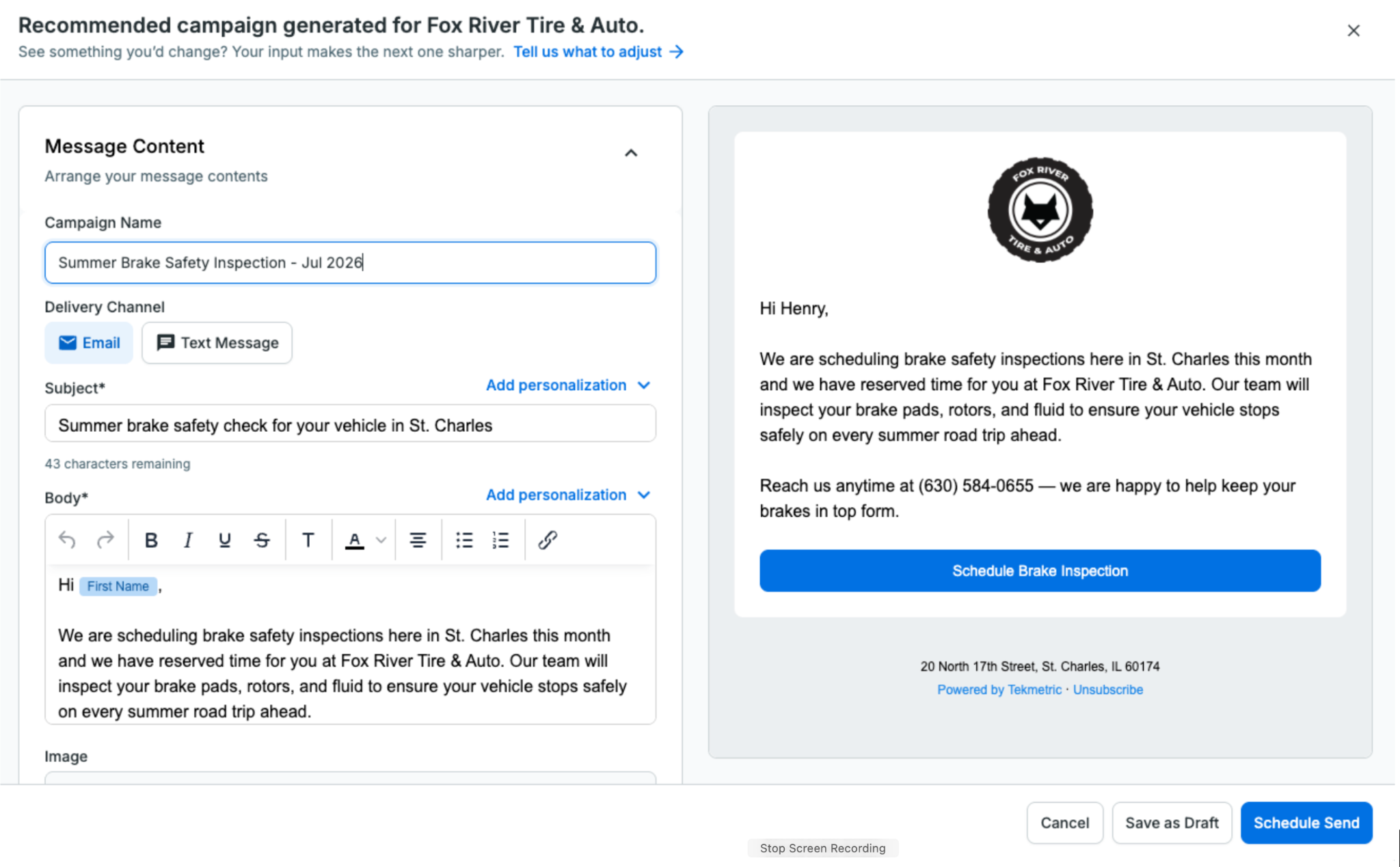
Introducing Recommended Campaigns

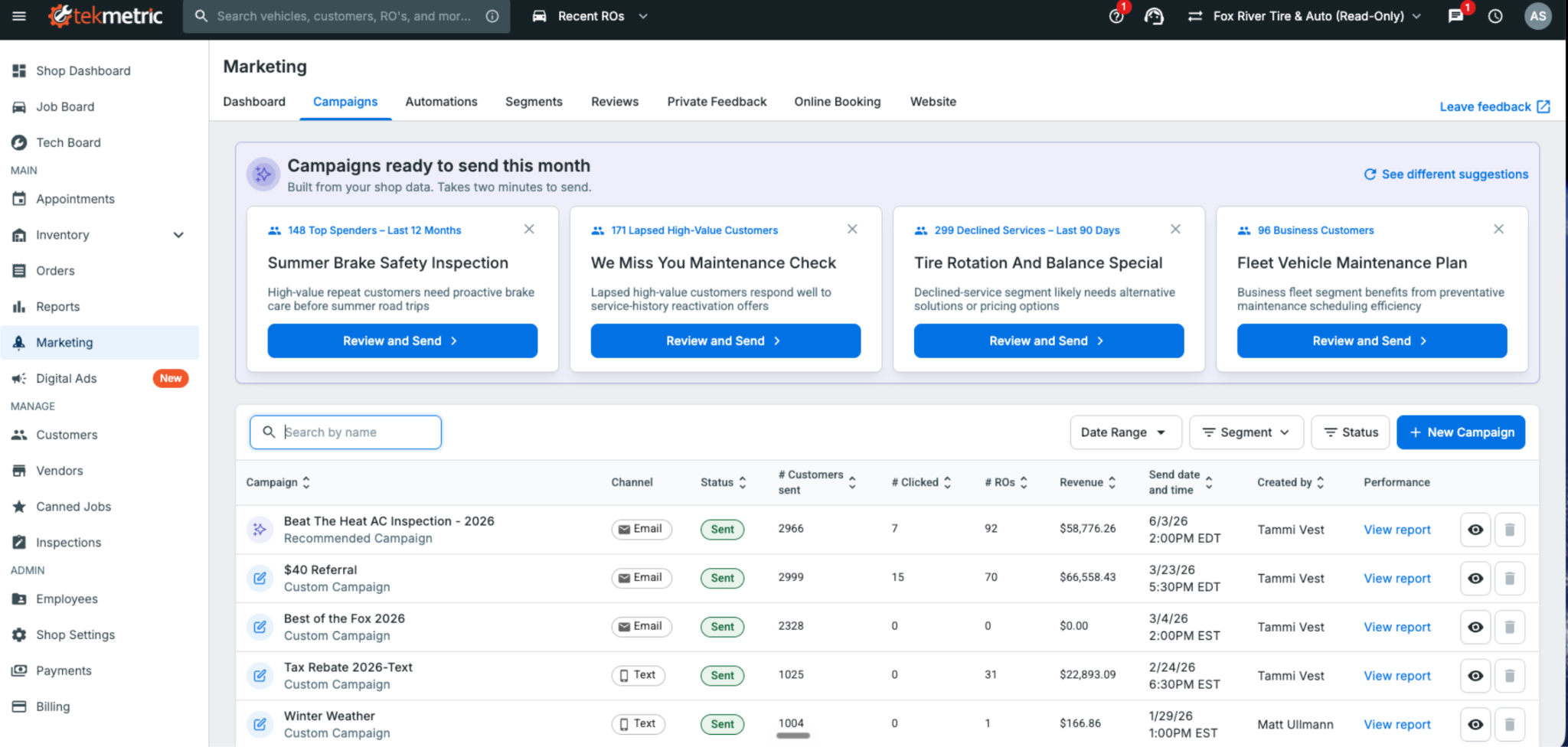
Tekmetric Marketing now builds ready-to-send campaigns. The message is written and the audience is selected. All that's left is to review, personalize, and send.

Most shop owners know the fastest way to fill this week’s bays is by bringing back customers who already trust them — the ones whose vehicles you serviced months ago but haven’t seen since. Re-engaging existing customers is one of the most effective ways to generate new repair orders.

The problem is finding the time to do it. Figuring out what to send, who to send it to, and when to send it almost always loses out to the car on the lift or the customer standing at the front counter

That's where Tekmetric Marketing's Recommended Campaigns come in.

Instead of starting with a blank page, Tekmetric Marketing does the heavy lifting for you. It analyzes your shop’s data and recommends campaigns that are ready to go. The audience is selected, the message is drafted, and all that’s left is for you to review it, make any changes you’d like, and send.

No blank screen. No guesswork.

Just a campaign ready to help bring customers back.

How It Works

Recommended Campaigns automatically surfaces ready-to-send campaigns tailored to your shop using the information Tekmetric already knows — your customers, previous campaigns, location, and seasonality.

You’re always in control.

Review the recommendation, personalize the message so it sounds like your shop, adjust the audience if you’d like, choose when to send it, and you’re done.

What used to take an hour staring at a blank screen can now be done in just a few clicks.

How Fox River Tire & Auto Uses Recommended Campaigns

Like most shops, Fox River Tire & Auto in St. Charles, Illinois, wants to stay connected with customers and bring them back when the time is right. But deciding what campaign to send, then building it from scratch, takes time most shops don't have.

Recommended Campaigns gives Tammi and her team a starting point instead of a blank page. They review the recommendations, edit the suggested content to fit their brand, and send with confidence.

"Recommended Campaigns provide an excellent launchpad for re-engaging with our customers. Instead of starting from scratch, we refine the suggested content to fit our brand and send it with confidence. The process is straightforward, time-saving, and always delivers."

— Tammi Vest, Business Manager, Fox River Tire & Auto

From Reports to Results

Recommended Campaigns is part of a much bigger shift in where Tekmetric Marketing is headed.

For years, marketing platforms have been good at showing you what already happened: campaign reports, open rates, clicks, and dashboards. That’s valuable, but it still leaves the work on you.

Tekmetric Marketing is evolving beyond reporting. Increasingly, it’s helping you decide what to do next, and doing more of the work for you.

You’ve already seen this with Recommended Review Responses. When a customer leaves a Google review, Tekmetric drafts a thoughtful response for you to review and approve.

Recommended Campaigns is the next step.

Instead of simply telling you that you should market to your customers more often, Tekmetric Marketing puts a campaign directly in front of you — already drafted, targeted, and ready to send.

Your marketing should keep working even while you’re heads-down under a hood.

One Year of Continuous Innovation

Since launching Tekmetric Marketing in the fall of 2025, thousands of shops have made it part of how they attract new customers and bring existing ones back.

We’ve also continued investing in the platform based on feedback from shops like yours.

Recent additions include:

Rich text and custom links in every email so you can create more engaging emails and link directly to booking pages, review sites, and promotions. Bold a headline, organize services into a list, and drop in links to your booking page, review site, or a promotion, in both campaigns and automated emails like review requests and service reminders.

Recurring blocks for your calendar for lunch breaks, holidays, staff meetings, and other recurring events. Easily add recurring lunch blocks, staff meetings or holidays to your calendar with a few clicks. No more appointments booked over your team events without you knowing. 

Smarter marketing-source tracking on appointments and ROs: Automatically associate appointments and repair orders with the latest marketing campaign or automation that reached the customer. When a customer books after getting a message, the marketing source pre-fills with the most recent campaign or automation sent to them, so attribution is accurate without the guesswork.

Recommended Review Responses, helping you respond to Google reviews in just a few clicks.

Every one of these improvements started with feedback from shop owners looking for simpler, smarter ways to grow their business.

Keep it coming.

Already using Tekmetric Marketing?

Head to Marketing → Campaigns to see what's recommended for your shop and send your first campaign in just a few clicks.


New to Tekmetric Marketing?

See how Tekmetric Marketing helps shops bring customers back with online booking, automated reminders, review generation, and Recommended Campaigns.

No items found.

What Is Auto Repair Shop Management Software, and Do You Actually Need It?

July 21, 2026

Read time: 3 min

read more

If you've been running your shop on paper repair orders, a whiteboard, or a mix of disconnected tools, you've probably wondered about shop management software. You’ve also likely questioned what it does and whether it's worth the cost and the disruption of switching to a digital system. 

This blog post answers both questions directly with a clear explanation of what auto repair shop management software is, how it works in a real shop, and the signs it might be time to look at one.

What Is Auto Repair Shop Management Software?

Auto repair shop management software is a platform that connects the core workflows of your shop — from writing estimates to completing repairs to collecting payment — in one place. Instead of tracking jobs on paper, managing parts in spreadsheets, and texting customers from your personal phone, everything lives in a single system your whole team can access.

At its core, it's a connected digital workflow for every repair, from the moment a car pulls in to the moment it pulls out.

📋 Quick Definition
Shop Management Software (SMS):
Also called a shop management system, is a digital platform that handles the operational and customer-facing workflows of an auto repair shop: repair orders, estimates, digital vehicle inspections, parts ordering, customer communication, invoicing, and reporting. Cloud-based platforms like Tekmetric can be accessed from any device without on-site servers.

A Step-by-Step Guide of What It Does

The easiest way to understand shop management software is to follow a repair from start to finish and see what the platform touches at each step.

1. Customer Arrives: Write-up and Scheduling

When a vehicle comes in, the service adviser opens a new repair order (RO) directly in the software. Customer info, vehicle history, and previous service notes are already there. There’s no need to search through masses of paper, and no digging through filing cabinets.

2. Technician Inspection: Digital vehicle inspection (DVI)

The tech completes a DVI on a tablet or mobile device, adding photos and videos of anything that needs attention. The results are automatically attached to the repair order and can be sent directly to the customer by text before the service adviser even picks up the phone.

This is one of the biggest workflow shifts shop owners find most beneficial. Customers can review inspection results, see pictures of the issue, and approve or decline work from their phone with no callbacks.

💬 From a Tekmetric customer
"The text feature is a huge hit — customers can review inspection results, check estimates, and approve repairs with just a click. The system is really streamlined and everything is integrated, making our workflow way smoother than before."
- Verified Tekmetric Customer, G2 

3. Estimate Building and Approval

Once the DVI is complete, the service adviser builds an estimate inside the same system. Parts prices, labor rates, and canned jobs are already set up so advisers aren't manually pricing every line. The estimate flows directly into the repair order once the customer approves.

4. Parts Ordering

Parts ordering happens inside the platform, too. Service advisers can submit orders to their suppliers directly from the repair order, track delivery status, and receive parts against open jobs without leaving the system.

5. Work is Performed and Technicians Stay on Track

The tech board gives service advisers and managers a real-time view of every job in the shop: what's waiting, what's in progress, and what's ready. Techs can update job status from their own device, which keeps the whole team on the same page without walking back and forth to the front desk.

6. Invoice and Payment

When the job is complete, the repair order becomes an invoice. Payment can be collected at the counter, sent by text, or processed through a payment link — depending on how the shop is set up.

7. Customer History

Every completed repair, every declined service, every inspection — it's all stored in the customer's profile. Next time they come in, the service adviser already knows what was done, what was deferred, and what's coming up. That's how you build trust and bring customers back.

What Does It Replace?

Most shops that switch to a management platform are replacing one or more of the following:

  • Paper repair orders and handwritten estimates
  • Printed or whiteboard job boards
  • Phone calls and personal texts for customer communication
  • Spreadsheets for parts inventory and pricing
  • Separate software tools for inspections, scheduling, and invoicing that don't talk to each other
💬 From a Tekmetric customer
"We were originally running our shop with two systems; one was for digital inspection and the other was our shop management system. ... I was spending $1,000 a month between the software companies and the IT support. And if the internet connection blipped for a split second, my digital inspection went down for about an hour. Now I'm paying a fraction of what I was before. … We saved a bunch of money, and the estimate writing process is much faster because the labor guide is built into the system."
- Stephane Grabina, Excluservice, Tekmetric Customer  

Signs Your Shop Needs a Digital Shop Management System 

You don't need to be a high-volume shop to benefit from management software. Here are the signals that tell you it's worth a closer look:

  • You're writing the same information down in multiple places such as a paper RO, whiteboard, or a text to the customer
  • Technicians are walking to the front desk to ask questions that should already be in the job
  • You can't tell at a glance how many cars are in progress or where each one stands
  • Customers call asking for updates that your team has to scramble to find
  • You're leaving declined work in your head instead of a system and losing follow-up opportunities
  • Your end-of-day reporting comes from memory or a calculator

None of these are signs of a poorly run shop. They're signs of a shop that has outgrown what paper and disconnected tools can do.

Do You Actually Need It?

If your shop is processing more than a handful of cars a day, the answer is yes. 

The goal of shop management software isn't to add another system to manage. It's to replace the friction in your current process — the paper, the callbacks, the manual pricing, the jobs that fall through the cracks — with one workflow your whole team can use.

"It integrates every aspect of running our shop — from scheduling appointments and messaging customers to integrating payments and sending invoices." - Gigi Collier, G2 Review, Tekmetric Customer 

📌 Bottom Line
Auto repair shop management software connects your repair orders, inspections, parts, customer communication, and reporting in one place. It replaces the paper and disconnected tools most shops are running on today and gives you the visibility to run your business with more confidence and less noise.

What to Look For in a Shop Management Platform

Not all platforms are built the same. The best ones don't just digitize each task — they connect them, so information moves from one step to the next without anyone rekeying it.

Repair order and estimate workflow
The platform should make it fast to write up a job, build an estimate, and convert it to a repair order without re-entering anything. Look for built-in labor guides and canned jobs so your team isn't pricing from scratch every time. On Tekmetric, estimates flow straight into the repair order, and labor and parts matrices keep pricing accurate and margins protected.

Digital vehicle inspections (DVI)
DVIs are one of the highest-impact features in any shop management platform. When technicians attach photos and videos and customers approve work from their phones, authorization rates climb and comebacks drop. The lift is measurable: shops on Tekmetric average $612 per repair order, rising to $741 once digital vehicle inspections are in use. Customers approve more work when they can see exactly what their vehicle needs.

Parts ordering and inventory
Look for parts ordering built into the repair order, so your team submits orders without leaving the job or logging into a separate portal. Tekmetric connects to more than 70 integrations, including the parts suppliers most shops already use, and inventory tracking helps prevent shortages while protecting your parts margin.

Customer communication
Two-way texting, digital estimates, and automated follow-ups should be built in, not bolted on through a third-party tool. Every extra place your team has to go to reach a customer is another place things fall through the cracks. Tekmetric keeps it in one platform: text a customer, send an estimate, and follow up on a declined service from the same screen.

Reporting and visibility
A strong platform gives you a live view of what's happening in your shop right now — car count, technician productivity, average repair order — without pulling a report or doing the math. Tekmetric's real-time reporting puts those numbers in front of you as the day unfolds, so you can coach your team and clear bottlenecks while it still matters, instead of finding out next week.

Cloud-based access
Cloud-based platforms don't need an on-site server to maintain or replace, they back up your data automatically, and they let you log in from anywhere — the shop, home, or the road. Shop owners on Tekmetric point to exactly this: no server to buy and swap out every few years, and the freedom to work from any terminal at any location. It matters more than most owners realize until the day they need it.

See How Tekmetric Works

Tekmetric is the shop management platform built for independent auto repair shops. Repair orders, digital inspections, parts ordering, payments, and real-time reporting all run in one system, on any device. There are no servers and no syncing between tools that don't talk to each other and one login for the whole team.

It was built by someone who lived through the problem. Founder and CEO Sunil Patel ran his own shop and built Tekmetric to clear the friction he hit every day. More than 15,000 shops now run on it, connected to more than 70 integrations for the parts suppliers, labor guides, and accounting tools they already use.

What Changes When the Workflow Connects

When inspections go digital, customers see exactly what their vehicle needs — photos, videos, and clear findings in a single message. When they understand the work, they approve more of it. The results track it: Tekmetric shops average $612 per repair order. With digital vehicle inspections in use, that average rises to $741. Add MotoVisuals educational videos, and it reaches around $800. It’s the same honest work, but more of it is approved because customers understand what they're paying for.

That's the pattern across the platform. Faster turnaround from check-in to checkout. More cars through the bays. A customer experience that earns repeat visits. The friction falls away, and shops run on results instead of guesswork.

💬 From a Tekmetric customer
"The amount of information that is available to the front desk, the service adviser, and the technician at a glance is very impressive, and the functionality of it together is great."
— Moises M., Guest Service Representative, G2 Reviews, Tekmetric Customer

‍

No items found.

Tekmetric CEO Sunil Patel Says Solving the Technician Shortage Starts With Culture

July 9, 2026

Read time: 3 min

read more

Creating a great culture at an auto repair shop is the key to keeping and growing technicians 

Cars are lasting longer than ever, but the technicians who fix them are becoming harder to find. The average vehicle on U.S. roads is about 13 years old, and there are not enough skilled technicians to go around.

The auto repair sector needs about 71,000 new technicians a year, and the training pipeline delivers only about 50,000. That is more than 20,000 unfilled positions every year, and the shortfall continues to grow.

That gap is stark.

For auto repair shops, the shortage is not a statistic. It is a daily question: who is going to fix the cars?

Sunil Patel, Tekmetric founder and CEO, said this crisis can be solved with auto repair shop improvements. Those solutions, however, often are not the ones most shop owners typically expect.

Before he founded Tekmetric, Patel owned Motorwerks, an independent repair shop in Houston, Texas, where he learned about the technician shortage from inside the bay. After years of seeing the problem as a shop owner and now as an automotive repair technology leader, Patel says the shortage will not be solved with better software alone. 

It starts with creating a great culture and valuing people. Patel speaks from firsthand experience, and his conviction on where to start is clear.

"I would spend a lot more time on the culture side of it," he said. "I would make sure I'm building an amazing culture that attracts amazing technicians."

The First Hire

Patel started Motorwerks as a one-man operation. He turned wrenches at night and took vehicles in during the day. There was no hiring strategy because there was no one to hire but himself.

Then the work outgrew him.

"Eventually I started getting busier and busier, and I needed a technician," Patel said.

He reached out to a contact at a local dealership and asked if he knew anyone looking for work. The technician that was recommended had just been let go from the dealership. He had made a mistake, but he was genuinely skilled. Patel took the chance and hired him.

It paid off.

"He would crank out hours, and he was really good at his job," Patel recalled.

The technician struggled with diagnostics, but that happened to be the part Patel enjoyed most. The two skillsets fit together. The shop kept moving.

That early hire taught Patel something he tells shop owners to this day: a great technician is rarely great at everything, and the shops that win are the ones that build a team around complementary strengths and skills.

Why Hiring Became Harder

The work itself is part of the challenge. Repairing cars has always been demanding, but it keeps getting harder, and nowhere more than at an auto repair shop.

Consider the difference between a dealership and a shop. A dealership technician works on a narrow set of vehicles from a single manufacturer, where the engineering stays largely consistent from one model to the next.

"If I take the most compact car versus the most expensive car, the underlying technology is going to be very similar at a dealership," Patel explained.

A technician who has never touched a particular model can usually still work on it because the platform underneath is familiar.

An independent auto repair shop has no such predictability. It can take all makes and all models.

"You don't know what's going to come through that door," Patel said.

Shops can see a Honda one morning, a Toyota that afternoon, and a European luxury car the next day. Every job can push a technician past what they know best. And the steepest part of that climb is no longer mechanical — it is electronic.

"The hard part of this is not the mechanical side," Patel said. "It's the electronic side where technicians usually get stuck."

Modern vehicles run on layered software, networked sensors, and advanced driver-assistance systems. The U.S. Bureau of Labor Statistics notes that technicians increasingly work on these complex electronic and computerized systems, and diagnosing them well is a specialized skill. Those specialized skills are exactly what the labor market is short on.

No shop can send its team to factory training for every brand. There are more than 50 vehicle manufacturers on the market. The best shops specialize the way Patel did at Motorwerks: for instance, one technician strong on European vehicles, another on Japanese, another on domestic. That mix lets a shop triage almost anything that rolls in, and it turns a hiring problem into a team-building one.

The Myths Keeping Young People Out

Ask most people to picture a technician, and the image is dated. Greasy hands. A hot bay. Hard, dirty work.

Patel said that picture is a mischaracterization of how technicians work today.

"A lot of that is changing," he said.

Some independent shops today are fully air-conditioned. Part of the work is no longer mechanical — it is electronic, diagnostic, coding, and programming.

"You've got to be able to use a laptop," Patel said.

The old image does real damage. It steers young people away from a career that has quietly modernized. Correcting it, in Patel's view, is one of the industry's most important recruiting jobs.

Culture Is the Real Reason Technicians Leave

Patel said one pattern separates the businesses that attract and keep great technicians from the ones that cannot. It is culture. And many shops have room for improvement.

"When a technician leaves a repair shop, it's not because of the money," Patel said. "It's mainly because of the culture and environment, or lack thereof, that causes them to leave to another shop."

There is a structural reason culture gets neglected. Many independent shops are founded by technicians.

"They're not trained in the fundamentals of running a business, attracting top talent, and building an amazing culture," Patel said.

Most learn it through trial and error.

His prescription is uncomfortable for a lot of owners. Ask your technicians how they actually feel about working for you. What do they like? What do they not like?

"These are things shop owners sometimes don't even want to ask because it's out of their comfort zone," Patel said.

But the question itself sends a message.

"I want to make sure I'm doing everything in my power to build an amazing environment for you to thrive in, to grow," Patel said. "This is an emotional thing.”

The cost of getting it wrong is measurable. Collision shops alone see 30 to 40 percent annual technician turnover, according to a 2024 industry study from I-CAR and the Society of Collision Repair Specialists. Replacing skilled workers runs an estimated one-half to two times their annual pay when recruiting, lost production, and training are totaled, per Gallup.

In a trade this short on talent, a culture that keeps people is not a soft benefit. It is a bottom-line advantage.

The Small Things Add Up

Building culture does not require a consultant or a budget line. At Motorwerks, it was lunch.

Every Friday, Patel bought the team lunch and let the technicians pick the food. Eventually, he started barbecuing in the back of the shop, then rotated the grilling duty across the crew. He  also experimented with better health care and benefits.

None of it was flashy. All of it pointed the same direction.

"Making them feel like we care is what it boils down to," Patel said.

Real Pay and a Real Career Ladder

Technician compensation is misunderstood. Many people assume a shop career is a financial dead end. It is not.

"Some of the best technicians can earn a solid six figures," Patel said.

The range is wide, and that is the part young people rarely hear. The median automotive technician earns about $49,670 a year, according to the U.S. Bureau of Labor Statistics. But the ceiling is far higher. Top flat-rate and master technicians routinely clear $100,000, and the fastest specialists earn as much as $160,000. The career rewards skill and speed, and its best earners are paid like it.

But money alone does not keep a technician on the job because the work is physically taxing. Technicians spend hours in awkward positions, lifting heavy parts, and holding components in place. Cuts, bruises, and back strain add up. Long days take their toll.

That is why Patel believes shops need a ladder, not just a wage. Owners should create a pathway for young technicians to grow into team leads, roles where their experience lifts the next generation rather than only their own billable hours. A career with a visible next step keeps good people in the industry.

Where Technology Fits

Patel is candid about the role Tekmetric plays in all of this. Technology did not create the shortage, but fragmented software makes technicians' jobs harder than they need to be.

For years, the shop technology stack was disconnected: one system for the front counter and a separate one for the technicians in the bay.

"Nobody's ever created an end-to-end solution from the time a vehicle is taken into a repair shop to the time it's fixed," Patel said.

Building that single, unified platform is the problem he set out to solve.

Tekmetric built tools specifically for technicians. The Tekmetric mobile app lets technicians move faster and target the exact friction that makes technicians skip digital vehicle inspections (DVIs).

Ask a technician why they do not run a DVI on every vehicle, and the answer is speed. It takes too long to photograph the issue, edit the images, and write it up. Tekmetric collapses that into something as simple as taking a video.

The payoff shows up in the numbers shops care about. The average repair order across Tekmetric shops is $612. With DVIs active, it climbs to $741. Add MotoVisuals video, and it reaches roughly $800. Faster, easier inspections do not just help the technician. They help the customer make an informed decision, and they help the shop grow.

The technicians are now the ones pushing owners to modernize.

Patel has watched technicians go to new shops and refuse to work on anything else other than Tekmetric. The platform's ease of use is what keeps them hooked.

"They tell the new shop, 'I'm not using whatever you have. You have to switch to Tekmetric,'" he said.

Building the Next Generation

Closing the shortage means reaching young people before they ever pick a trade. Patel is betting on the classroom.

Tekmetric is leading the effort by working directly with trade schools to understand what it can do to help, and what it found was a gap. Many training programs still run on pen and paper, or carry a cost for software and repair guides that creates a financial barrier to invest in other places.

"A young person comes in who's stuck on their iPhone, and they think, 'This is how this industry operates,'" Patel said.

The disconnect between the technology in a student's pocket and the technology in the classroom is its own recruiting problem.

To combat this, Tekmetric gives its platform to these schools for free. The goal is to let the next generation see, from day one, that a modern shop runs on modern tools.

Patel's pitch to any high school guidance counselor is straightforward. A student can leave high school, work as a technician for five to 10 years, and open a shop of their own.

"That is something exciting, and it's meaningful income," he said. “It is a path to ownership, not just a job.”

Why It Matters to Him

Patel has been in this industry long enough to feel its history personally, back to the muscle cars of the 1980s.

"It's part of the fabric of America, and it's what makes this country great," he said.

He knows the pains that shop owners, service advisors, and technicians carry, because he has carried them himself.

He is hopeful the shortage reverses, and clear-eyed about what will and will not get it there. Better tools help. Better training helps. Better culture helps most.

The shortage, in the end, is a people problem. Patel's whole argument is that shops should start treating it like one.

"AI is not going to solve fixing cars," Patel said. "That's something a human being is going to have to do for a while."

Average Auto Repair Labor Rates by State

June 30, 2026

Read time: 3 min

read more

Find out what shops in your state are charging, and how to set a labor rate that keeps your shop profitable

In the automotive repair industry, your labor rate is more than just a number on an invoice — it is one of the key metrics that drives your business's profitability and overall growth. For shop owners, staying competitive while maintaining healthy margins requires a clear understanding of how labor costs fluctuate across the country. But knowing the national average is only half the picture. The more important question is: how does your shop compare?

Whether you are running a small independent shop or a high-volume operation, knowing where you stand relative to the average labor rate in your state — and against top-performing shops in your market — is essential.

This guide covers the current landscape of automotive repair labor rates across all 50 states, the factors that drive those numbers, and a step-by-step roadmap for setting a rate that supports your shop's long-term success.

Methodology and Key Terms

Tekmetric built this auto repair shop index as a community resource, backed by data from more than 10,000 shops across North America. Shops can use this tool to benchmark themselves and see how they compare state by state.

Key Terms to Know

Labor rate: The retail price per hour charged to the customer for repair services.

Flat-rate: A pricing model where a job is billed based on a predetermined number of hours from a labor guide, regardless of how long the actual repair takes.

Effective labor rate (ELR): The actual amount of labor revenue earned per billed hour after accounting for discounts, menu pricing, and unbilled time.

Understanding these terms will help you interpret the data below and apply it to your specific situation.

Mechanic Labor Rates by State

The average labor rate across the United States is $132 per hour, with the lowest state at $85 per hour and the highest at $197 per hour. Labor rates vary significantly by state, primarily driven by local cost of living and competition.

📊 See How Your Shop Compares — Free

The data below tells you what shops in your state are charging. But the labor rate is only one piece of the picture. The Tekmetric Shop Index lets you benchmark your shop across the four metrics that actually drive profitability — ARO, car count, parts margin, and effective labor rate — against thousands of real shops nationwide.

It's free, takes less than two minutes, and requires no Tekmetric account.

➡ Benchmark Your Shop Now →

Hourly Automotive Labor Rates by State

  • Alabama $124
  • Alaska $161
  • Arizona $145
  • Arkansas $116
  • California $156
  • Colorado $151
  • Connecticut $141
  • Delaware $141
  • Florida $138
  • Georgia $137
  • Hawaii $142
  • Idaho $136
  • Illinois $135
  • Indiana $123
  • Iowa $123
  • Kansas $120
  • Kentucky $126
  • Louisiana $132
  • Maine $110
  • Maryland $141
  • Massachusetts $133
  • Michigan $130
  • Minnesota $137
  • Mississippi $125
  • Missouri $120
  • Montana $135
  • Nebraska $127
  • Nevada $152
  • New Hampshire $128
  • New Jersey $140
  • New Mexico $141
  • New York $125
  • North Carolina $123
  • North Dakota $135
  • Ohio $125
  • Oklahoma $129
  • Oregon $150
  • Pennsylvania $115
  • Rhode Island $134
  • South Carolina $130
  • South Dakota $120
  • Tennessee $127
  • Texas $141
  • Utah $135
  • Vermont $110
  • Virginia $136
  • Washington $152
  • West Virginia $100
  • Wisconsin $125
  • Wyoming $134

Factors That Impact Automotive Labor Rates

Why do auto repair labor rates vary so widely from state to state? A few key factors drive the differences.

Cost of Living

In states with a higher cost of living, shop owners face higher wages to attract technicians, more expensive rent, and elevated utility and supply costs. Those overhead realities push labor rates up — not because shops are padding their margins, but because the math demands it.

Shop Type and Specialization

Dealerships typically carry the highest labor rates because of their overhead, factory-trained technicians, and reliance on OEM parts. Independent shops often have more pricing flexibility, particularly for routine services like oil changes. Specialty shops — focused on European vehicles, diesel, or performance — tend to command higher rates as well.

➡ Benchmark Your Shop Now →

Technician Expertise and Certifications

A diagnostic job requires a different skill set than a brake job. Shops that employ ASE-certified technicians or master technicians can and should charge accordingly. The rate reflects the expertise required to do the work correctly.

How to Set Your Labor Rate (Step by Step)

Setting your rate shouldn't be based on what the shop down the street is charging. It should be a data-driven decision grounded in your actual costs and performance targets.

Step 1: Calculate Your "Loaded" Labor Cost

Start with what it actually costs you to have a technician on the floor. This includes:

  • Wages and overtime
  • Payroll taxes
  • Benefits (health insurance, 401k)
  • Workers' comp and liability insurance
  • Training and certifications

Divide that total annual cost by the number of billable hours that technician produces in a year. That's your loaded cost — and it doesn't include any profit margin yet.

Step 2: Account for Overhead

Your labor revenue also needs to cover the cost of running the business:

  • Rent
  • Utilities and shop supplies
  • Marketing and software
  • Taxes

Step 3: Determine Your Target Profit Margin

Tekmetric shops average 65% labor profit margins. If your loaded cost for a technician is $45 per hour and you want a 65% margin, your base labor rate should be at least $128 per hour.

Step 4: Benchmark Against Your Market

Your internal numbers come first, but you can't ignore the local market. If your rate is $128 and every comparable independent in your area is at $100, you need to either clearly justify your value — through better inspections, faster turnaround, stronger communication — or find ways to reduce overhead. Benchmark against shops of similar size, service mix, and geography.

Step 5: Implement a Labor Matrix

Not every repair order is equal. Shops that implement a labor matrix can automatically adjust rates based on job complexity — billing more appropriately for diagnostic work or specialty repairs without manually recalculating every estimate.

➡ Benchmark Your Shop Now →

How Tekmetric Helps Your Shop Stay Profitable

Managing labor rates manually is a recipe for inconsistency and missed revenue. Here's how Tekmetric gives you the tools and data to stay ahead.

Know Where You Stand with the Tekmetric Shop Index

Before you can optimize your labor rate, you need to know how your performance compares to other shops. The Tekmetric Shop Index gives you free, instant benchmarking across four metrics: ARO, car count, parts margin, and effective labor rate. Enter your shop's numbers and see exactly where you rank against thousands of shops nationwide — no account required, no sales call, no commitment.

You can't improve what you don't measure. This is where that work starts.

➡ Benchmark Your Shop Now →

Real-Time Profitability Tracking

Tekmetric's reporting features give you live visibility into ARO, car count, revenue, and technician productivity — so you always know how your shop is performing, not just at the end of the month.

Custom Labor and Parts Matrices

Tekmetric lets you build a labor matrix that automatically adjusts rates by job type. A custom parts matrix works the same way on the parts side, protecting your margins consistently across every repair order.

Digital Inspections That Justify Your Rate

Tekmetric's digital vehicle inspections let your team send photos and videos of needed repairs directly to a customer's phone. When a customer can see the worn brake pad or the leaking gasket for themselves, they're far more likely to approve the work — and far more comfortable with the rate attached to it.

Accurate Labor Guide Integration

Tekmetric integrates with industry-standard labor guides so your estimates are based on real, accurate times — not guesswork or memory. That means technicians get credited fairly under a flat-rate system, and your service advisers spend less time on paperwork and more time with customers.

Benchmark Your Insights Now

Knowing the average labor rate in your state gives you a useful reference point. But the shops that stay profitable long-term don't stop at state averages — they benchmark continuously, track the right metrics, and make adjustments based on data instead of instinct.

Your labor rate should reflect your actual overhead, your team's capabilities, and the quality of service your customers experience. Use the state data above as a starting point, then go deeper with the Tekmetric Shop Index to see how your shop compares across every metric that drives profitability.

Ready to see where you stand? Benchmark your shop free with the Tekmetric Shop Index →

Your Tekmetric Shop Index Rankings Are In. Here's What to Do With Them.

June 29, 2026

Read time: 3 min

read more

Compare your shop's performance against real data from thousands of auto repair shops by state.

Benchmarking data is only useful when it changes what you do next.

If you've run your shop's numbers through the Tekmetric Shop Index and seen where you rank on ARO, car count, parts margin, and effective labor rate — good. You have a diagnosis. Now you need a plan.

This post walks through what each gap in your TSI results is actually signaling, which operational levers move the needle on each one, and how to build a focused 90-day improvement target that gives your team something concrete to work toward.

Start With the Biggest Gap

Your TSI results will show you four rankings. Resist the temptation to try to improve all four at once. The shops that make the most progress pick the metric with the largest gap and stay focused on it for a full quarter before adding another priority.

Trying to improve ARO, car count, parts margin, and effective labor rate simultaneously often means improving none of them because the operational changes required for each are different and can compete for your team's attention.

So step one is simple: look at your four rankings, find the biggest gap from the industry benchmark, and start there.

Gap: ARO Below Benchmark

If your average repair order is lagging, the most common root cause is inspection performance. Either digital vehicle inspections (DVIs) aren't being completed consistently, or they're being completed but not converted into approved work.

A few questions to answer before you act:

  • What percentage of repair orders have a completed DVI attached?
  • Of the DVIs sent to customers, what percentage include photos or video?
  • What's your close ratio on recommended work?

If DVI completion is below 90%, that's almost always the first lever. Tekmetric's Inspection Report shows completion rates by technician, making it straightforward to identify who needs coaching and who's already performing well.

"Now I can look at everybody at a glance. I can be in a different state, different city and know exactly what's going on in each location all the time."  — Leroy Ingram, Ooroo Auto Care, Tekmetric Customer

If DVI completion is strong but close ratio is low, the issue is likely in how inspections are being communicated to customers — photo and video quality, the language in findings, how quickly the estimate follows the inspection.

Shops on Tekmetric also have access to the Parts and Labor Matrix, which protects against underpricing. It can be a quiet ARO killer that doesn't show up until you look at margin data.

➡ See how your ARO compares →

Gap: Car Count Below Benchmark

A car count gap can mean two different things depending on how it breaks down: you're not bringing in enough new customers, or your existing customers aren't returning at the rate they should. Both problems need attention, but they need different solutions.

For new customers, the questions are acquisition-focused. Tekmetric's online booking gives customers a way to find you and schedule an appointment 24/7 — filling bays without your team picking up the phone. The more friction you remove from the booking process, the more new customers follow through.

For returning customers, the questions shift to communication. Are declined jobs being followed up? Are customers receiving service reminders? Tekmetric Marketing automates follow-ups on declined work and scheduled maintenance intervals — so your team stays in contact with your car count without adding manual effort.

"Seven hundred and two dollars in ad spend has generated 11 net-new customers and $12,802 in new customer revenue — an 18.3x return on ad spend before factoring in the lifetime value of those customers returning for future visits."  — Tanner Markham, Phase 2 Automotive, Tekmetric Customer

➡ See how your car count compares →

Gap: Parts Margin Below Benchmark


A parts margin gap is almost always a pricing problem — either your markup isn't keeping up with cost increases, you're applying flat markup where a tiered matrix would protect margin better, or your team is manually overriding prices inconsistently.

The fix starts with reviewing your Parts Matrix in Tekmetric. A well-structured matrix automatically applies the right markup based on part cost ranges, removing the inconsistency that comes from individual pricing decisions at the job level.

After updating the matrix, run your Parts Purchased Report to verify that retail pricing is reflecting the changes accurately. This is also a good time to cross-reference against recent vendor invoices — if costs have moved significantly in the last 6 months, your matrix thresholds may need updating.

➡ See how your parts margin compares →

Gap: Effective Labor Rate Below Benchmark


If your effective labor rate is trailing your posted rate, the most common culprits are inconsistent discounting, flat-rate job structures that cap labor recovery, or package pricing that doesn't account for actual labor time.

Start by pulling your Discount Detail Report to see where and how often discounts are being applied. If they're being applied inconsistently across your team, that's a coaching conversation — and Tekmetric's real-time reporting makes it easy to see which service writers are discounting most frequently.

The Labor Matrix is the structural fix. Similar to the parts matrix, a tiered labor matrix adjusts the billed hours or dollar amount based on configured ranges, protecting margin without changing what customers see on the invoice.

➡ See how your effective labor rate compares →

Building a 90-Day Improvement Target

Once you've identified your primary gap and the lever that addresses it, the last step is turning it into a measurable target for the next 90 days.

A good 90-day target is specific, tied to a leading indicator, and gives your team something to track week over week. For example:

  • ARO gap: "Increase DVI completion rate from 72% to 90% over 90 days, tracked weekly via Inspection Report"
  • Car count gap: "Launch declined-job follow-up automation within 30 days; track returning car count monthly for 90 days"
  • Parts margin gap: "Update Parts Matrix for all parts under $150 within two weeks; track parts margin weekly via Parts Purchased Report"
  • Labor rate gap: "Reduce average discount percentage by 15% over 90 days, tracked via Discount Detail Report"

These aren't arbitrary numbers — they're examples of the leading-indicator approach that lets you see progress before the outcome metric moves. Set yours based on where you're actually starting, not where you want to end.

Check Your Rankings Quarterly

Your TSI results are a snapshot. Set a reminder to re-run the benchmarking every quarter so you can see whether your numbers are moving relative to the industry — not just relative to your own history.

The shops that use benchmarking most effectively are the ones that treat it as a recurring discipline, not a one-time exercise.

"Thanks to Tekmetric, we've really enhanced our business and are looking to expand. We're the #1 shop, 6 years in a row in Upstate New York."  — Chris Chevalier, AAA Auto Repair, Tekmetric Customer

➡ Benchmark your shop now →

Takeaways

  • Start with your biggest gap — don't try to move all four metrics at once.
  • ARO gaps usually trace back to DVI completion rates or close ratios.
  • Car count gaps split into acquisition and retention problems — each needs a different fix.
  • Parts margin gaps are almost always a pricing matrix issue.
  • Effective labor rate gaps often come down to discounting habits and job structure.
  • A 90-day leading-indicator target turns benchmarking data into team direction.

➡ Benchmark your shop now →