Your auto parts inventory management system should match the operational pace of your shop, and the system shouldn’t be so complex or time-consuming that it takes time away from hours better spent repairing cars.
Running a more efficient shop will lead to a better experience for customers, more clarity in the repair process, and ultimately more approved repairs. That means more money for your shop!
Still using pen and paper to keep track of your shop's parts inventory? Let's help you find a better way with a modern, cloud-based shop management system.
Managing Inventory with Pen and Paper
We hear it all the time: if it ain't broke, don't fix it! And sure, that might be true for your favorite recliner, but when it comes to running your shop like a well-oiled machine, there's some big room for improvement. Especially if you're relying on pen and paper.
And we get it, pen and paper requires very little training, can be completed offline, it's pretty cheap, and most importantly it's the way it’s always been done.
In reality, pen and paper records may seem inexpensive at first, but costs quickly add up:
The process is generally slow and requires managers to flip through multiple pages in a notebook or keep a long log of everything. If you need to audit a purchase, you'll be digging through pages manually.
Paper records are easily destroyed, lost, and damaged, and creating copies is a time-consuming task in and of itself.
Hand-writing! We all know it takes a nurse to read a doctor's handwriting, but what about a technician's or a shop owner's? Chances are, someone else might have a hard time reading your records. It might sound silly, but it’s a simple issue that can lead to huge problems.
Your shop has a lot of moving parts -- no pun intended. Tracking repair orders, contacting customers, and completing digital vehicle inspections, everything is so much easier with the right tools for the job. Especially when we're talking about tracking your shop's parts inventory.
Instead of hoping you wrote it down right or even at all, wouldn’t it be easier to track such items with a digital database?
Going digital, but not quite modern
We sometimes hear that shops have upgraded away from the really old school pen and paper methods to shop management tools the generally rely on spreadsheets
Spreadsheets are essentially very simplistic databases, and understandably, plenty of shops have been using spreadsheets for decades. Programs like Excel are a clear upgrade from a humble, physically maintained auto parts inventory management records system.
But ultimately, spreadsheets aren’t built with auto parts inventory management in mind or with auto workers in mind. It can be difficult to set up your own spreadsheet system, and there’s always the risk of human error or simply losing spreadsheets stored on a personal computer.
That's where a modern cloud-based system comes in.
Modern Parts and Inventory Management with Shop Management Software
Shop management software can be automated and comes with pre-created templates and tables ready for the user to fill in.
With auto parts inventory management software, service writers don’t have to invent their own templates as they would with a spreadsheet records system, and the software does much of the record-keeping for them. Shop management systems like Tekmetric have portals specifically dedicated to parts inventory management.
If your old parts management system has your shop stuttering like a rusted-out pickup running on empty, systems like Tekmetric may be the perfect solution to get your team on track with an intuitive auto parts inventory management system built for teams just like yours.
Tekmetric lets you put together and track your parts orders, store information about vendors, monitor parts sales performance over time, and even put together and save special parts lists for jobs your shop completes on a regular basis
Upgrade Your Shop's Inventory Management
Maybe your team conducts a yearly deep dive into its inventory but only supplements this with brief monthly bookkeeping reviews and weekly maintenance checks. Or maybe your shop moves enough stock that staying on top of auto parts inventory management requires fastidious, day-to-day monitoring
In the former scenario, it is easy for stock problems to creep up on shop owners without anyone noticing for some time. For shops carrying more parts and conducting more frequent monitoring, the greatest challenge may be sorting a massive volume of parts.
Whether you run a shop that sells a lot of stock parts or makes more profit on labor, the one consistent way to gain control over the pace of parts inventory management is to use a program like Tekmetric.
A shop management software worth its salt centralizes information about what you have on your shelves and lets you update records fast.
Inventory can include items like oil, tools, and large equipment. It also includes stock items, or parts which are sold to the customer during the course of repairs, such as gaskets and timing belts.
Inventory management and parts management go hand in hand, but outside of labor profits, the profit a shop brings in ultimately comes from parts markup at the point of sale. Consequently, there’s very little room for error in managing parts.
Simply put, mismanaged parts means money left on the table and unhappy customers—a combination no shop owner or automotive team wants to experience.
A good auto parts inventory management system should let you:
• Know what parts you have in stock and how many you have
• Track what sells and what sits on the shelf longer than it should
• Help you plan for growth.
With the right auto parts inventory management system, your shop can go from disorganized to a well-oiled machine generating more and more profit.
The holidays are a special time of year when we make memories with the family, give thanks, and spread joy. However, with social distancing guidelines still in effect, this holiday season will look a little different. Because this year has been challenging for many people, it’s more important than ever to stay positive and spread cheer to past, current, and prospective customers.
Making people feel warm and fuzzy this holiday season will get them to remember you, leading to more business immediately or at some point in the future. And even if not every person you positively impact comes to your shop, it’s okay! You’re still paying it forward to your community, which bolsters your shop’s reputation and can lead to more referrals down the road.
Here are ten ways you can connect with guests this holiday season.
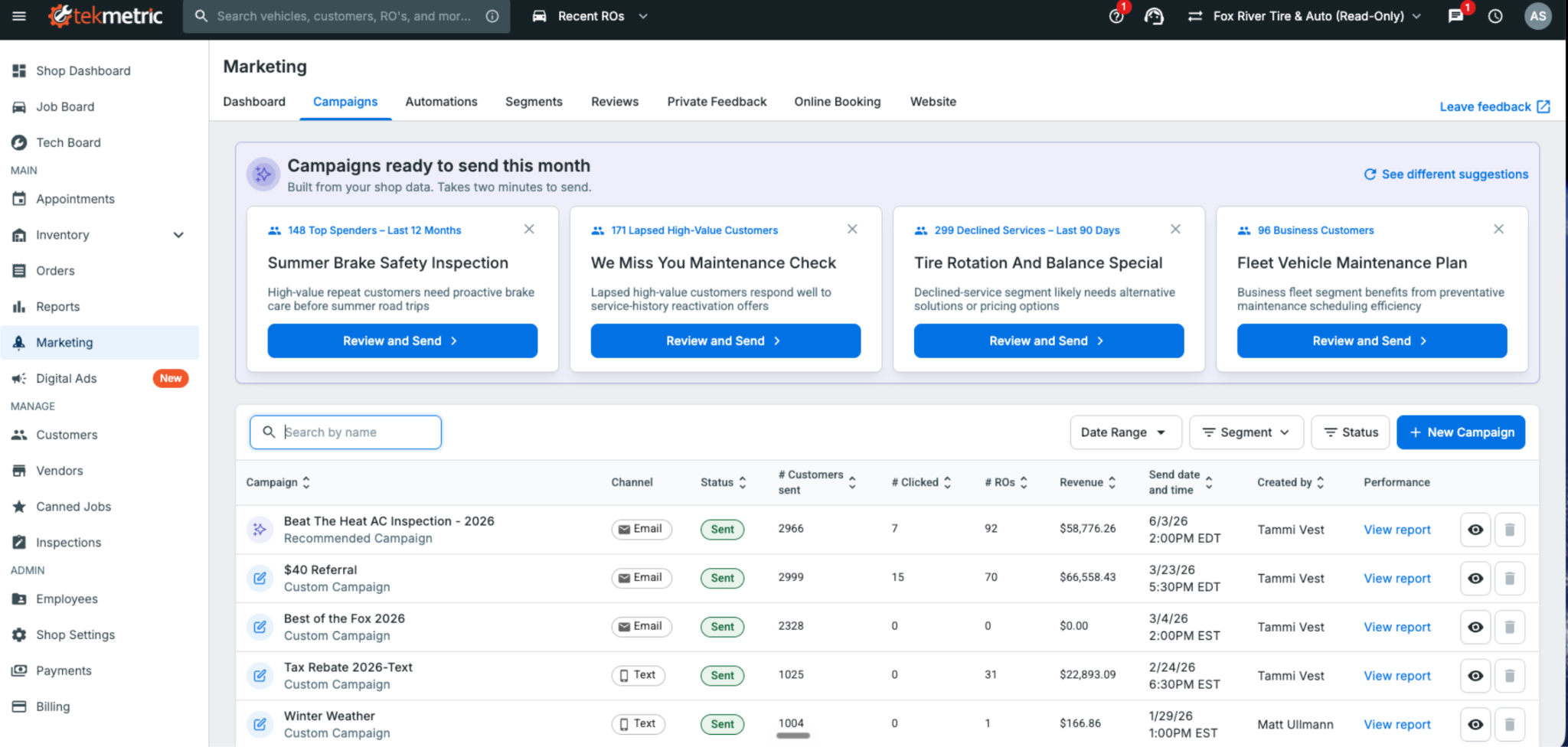
Tekmetric Marketing now builds ready-to-send campaigns. The message is written and the audience is selected. All that's left is to review, personalize, and send.
Most shop owners know the fastest way to fill this week’s bays is by bringing back customers who already trust them — the ones whose vehicles you serviced months ago but haven’t seen since. Re-engaging existing customers is one of the most effective ways to generate new repair orders.
The problem is finding the time to do it. Figuring out what to send, who to send it to, and when to send it almost always loses out to the car on the lift or the customer standing at the front counter
That's where Tekmetric Marketing's Recommended Campaigns come in.
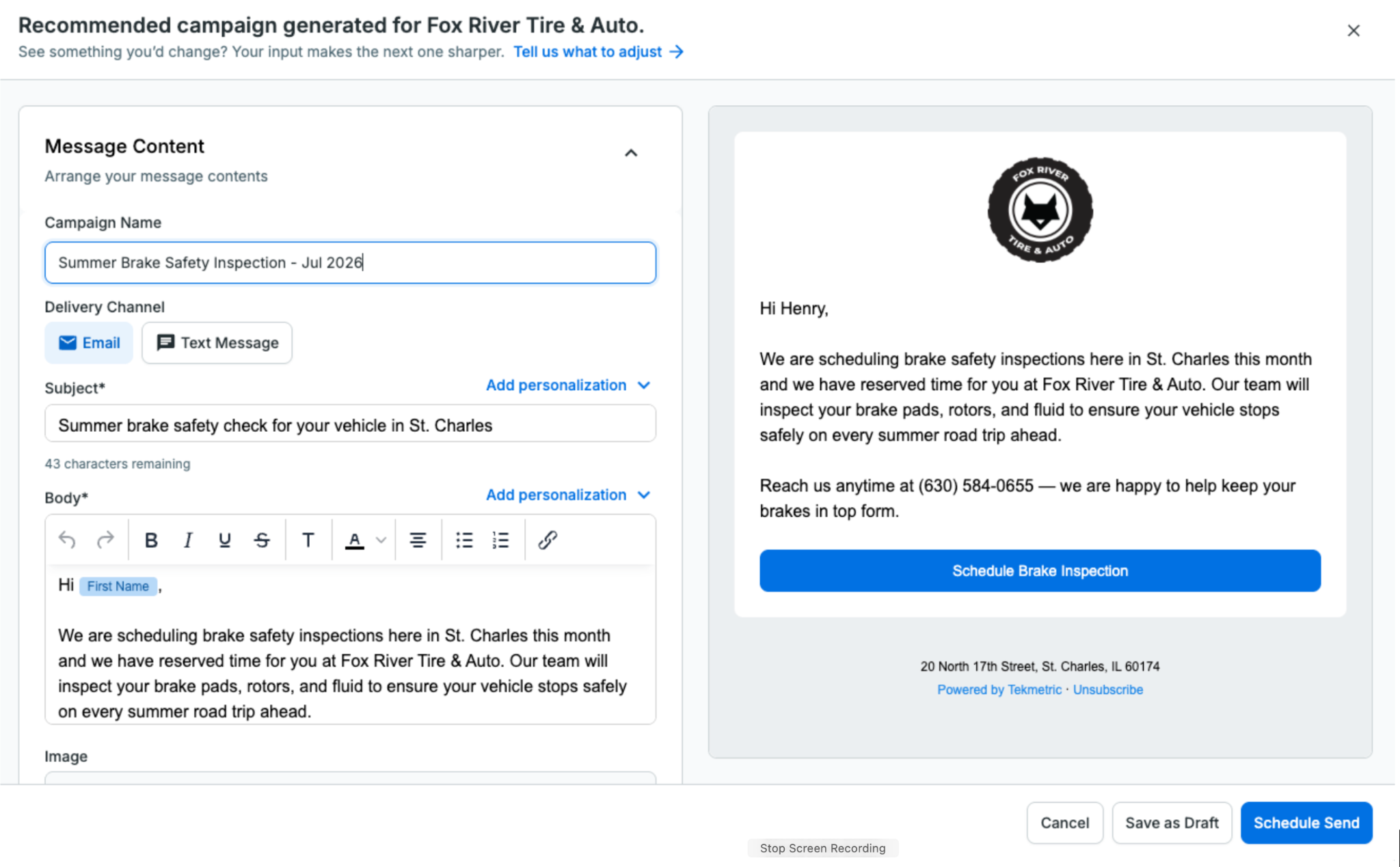
Instead of starting with a blank page, Tekmetric Marketing does the heavy lifting for you. It analyzes your shop’s data and recommends campaigns that are ready to go. The audience is selected, the message is drafted, and all that’s left is for you to review it, make any changes you’d like, and send.
No blank screen. No guesswork.
Just a campaign ready to help bring customers back.
How It Works
Recommended Campaigns automatically surfaces ready-to-send campaigns tailored to your shop using the information Tekmetric already knows — your customers, previous campaigns, location, and seasonality.
You’re always in control.
Review the recommendation, personalize the message so it sounds like your shop, adjust the audience if you’d like, choose when to send it, and you’re done.
What used to take an hour staring at a blank screen can now be done in just a few clicks.
How Fox River Tire & Auto Uses Recommended Campaigns
Like most shops, Fox River Tire & Auto in St. Charles, Illinois, wants to stay connected with customers and bring them back when the time is right. But deciding what campaign to send, then building it from scratch, takes time most shops don't have.
Recommended Campaigns gives Tammi and her team a starting point instead of a blank page. They review the recommendations, edit the suggested content to fit their brand, and send with confidence.
"Recommended Campaigns provide an excellent launchpad for re-engaging with our customers. Instead of starting from scratch, we refine the suggested content to fit our brand and send it with confidence. The process is straightforward, time-saving, and always delivers."
— Tammi Vest, Business Manager, Fox River Tire & Auto
From Reports to Results
Recommended Campaigns is part of a much bigger shift in where Tekmetric Marketing is headed.
For years, marketing platforms have been good at showing you what already happened: campaign reports, open rates, clicks, and dashboards. That’s valuable, but it still leaves the work on you.
Tekmetric Marketing is evolving beyond reporting. Increasingly, it’s helping you decide what to do next, and doing more of the work for you.
You’ve already seen this with Recommended Review Responses. When a customer leaves a Google review, Tekmetric drafts a thoughtful response for you to review and approve.
Recommended Campaigns is the next step.
Instead of simply telling you that you should market to your customers more often, Tekmetric Marketing puts a campaign directly in front of you — already drafted, targeted, and ready to send.
Your marketing should keep working even while you’re heads-down under a hood.
One Year of Continuous Innovation
Since launching Tekmetric Marketing in the fall of 2025, thousands of shops have made it part of how they attract new customers and bring existing ones back.
We’ve also continued investing in the platform based on feedback from shops like yours.
Recent additions include:
Rich text and custom links in every email so you can create more engaging emails and link directly to booking pages, review sites, and promotions. Bold a headline, organize services into a list, and drop in links to your booking page, review site, or a promotion, in both campaigns and automated emails like review requests and service reminders.
Recurring blocks for your calendar for lunch breaks, holidays, staff meetings, and other recurring events. Easily add recurring lunch blocks, staff meetings or holidays to your calendar with a few clicks. No more appointments booked over your team events without you knowing.
Smarter marketing-source tracking on appointments and ROs: Automatically associate appointments and repair orders with the latest marketing campaign or automation that reached the customer. When a customer books after getting a message, the marketing source pre-fills with the most recent campaign or automation sent to them, so attribution is accurate without the guesswork.
Recommended Review Responses, helping you respond to Google reviews in just a few clicks.
Every one of these improvements started with feedback from shop owners looking for simpler, smarter ways to grow their business.
Keep it coming.
Already using Tekmetric Marketing?
Head to Marketing → Campaigns to see what's recommended for your shop and send your first campaign in just a few clicks.
New to Tekmetric Marketing?
See how Tekmetric Marketing helps shops bring customers back with online booking, automated reminders, review generation, and Recommended Campaigns.


.webp)


.svg)



.svg)

.svg)
.svg)
.svg)
.svg)
.svg)
.svg)
