Old habits are hard to break, especially when it comes to the physicality of handwritten notes.
A pen and a piece of paper can provide a better sense of security—they’re tangible and tactile. In our minds, we view paper as something we “own”, which makes it seem more reliable and easily obtainable.
But is pen and paper more reliable than digital tools?
Although the trusty pen and paper method does have perks, there’s a time and a place for everything. Which leads us to paper’s modern day competitor: digital software.
Switching paper out for a modern, digital format will enhance legibility, make archiving far easier than having file cabinets full of papers, and will strengthen collaboration across your team. Not to mention, you don’t run the risk of a fire or flood destroying your shop’s backed up data the way a natural disaster would with paper files and documents.
Now, this isn’t to say that digital software will replace every single piece of paper; however, software can successfully improve the efficiency of projects—especially when it comes to running an auto shop.
Let’s bring it back to the initial question: is automotive work order software a replacement for pen and paper? The rough answer is "yes," although there may be times where you still want to have paper as an option.
But many pen and paper tasks can be replaced, and should, for better productivity and organization. Automotive work order software can astronomically enhance your shop’s productivity and organization in ways that traditional methods cannot.
In your personal life, paper can take precedence in whichever way you wish. But in your shop, opting in for a digital system instead of pen and paper has more pros than cons.
Pen & Paper vs. Software
Let’s look at the data on why software has the ability to replace pen and pen and paper: A study conducted by Deloitte in 2019 found that 85% of all SMBs (small and medium-sized business owners) report that the digital tools they are using have helped their business in some way.
The study gathered 1,000 SMBs to take part in the survey. Here are the key findings:
Businesses with advanced use of digital tools are five times more likely to reach new customers than their less digitally advanced counterparts.
Tech-savvy businesses are three times more likely to create new products and services and are two times more likely to create jobs than those that don’t rely on technology as much.
Businesses that leverage digital tools are three times more likely to experience revenue growth and twice as profitable.
Writing things down on a piece of paper definitely has its benefits, and shouldn’t be ridiculed as a form of notetaking. In fact, many individuals opt into pen and paper when they’re either in a hurry, or need to focus and want to prevent any distractions.
I’m sure you’re thinking to yourself, “Why is a digital software company telling me this? Aren’t they selling software?” Well, you’re not wrong, but our team at Tekmetric believes in highlighting all aspects of auto repair shops—and although modernizing your shop is an ideal way to make strides in the auto repair industry—traditional mediums shouldn’t be completely eradicated.
So, before we get into the benefits of software, let’s take a look at when handwritten notes make for an ideal option.
When the Good Ol’ Pen and Paper Still Comes in Handy
Ask yourself when was the last time you used a pen and a piece of paper to jot something down. There’s a good chance it was because of one of the following scenarios:
You were in a hurry,
You needed to focus, or
You wanted to make a note-to-self.
These reasons for taking handwritten notes can also be applicable in your shop. Whether you’re a technician, service writer, or shop owner, focus and efficiency are key components of your day.
Although you may have your habitual way of jotting down thoughts and reminders, where pen and paper are lacking is filling out work orders (or Repair Orders) in your shop. Manually writing down an RO for a customer, even on a templated piece of paper, will get in the way more than it helps.
That’s why creating room for a more secure, efficient, and clean form, like digital work order software, will enhance your shop in more ways than one.
6 Ways Digital Software will Enhance your Auto Repair Shop
A huge part of auto shop’s are the work orders created, under way, completed, and archived. Having the ability to not only make the process easier for your team, but also streamlining the work order life cycle is a shop innovation you won’t regret.
1. Effective Collaboration Across the Board
Think of how many moving parts there are in the work order process: technicians collaborate with the service writers on parts needed, repairs completed, and any additional findings that need to be addressed; service writers collaborate with both the techs on in-progress work orders and customers on where their car is at in the repair process; and customers collaborate with the service writers by having to sign off on repairs.
With pen and paper, the above steps require quite a bit of juggling. The technician might be trading sticky notes with the service writers, and service writers would need to get customers to sign off on estimates, invoices, and repair orders.
At the end of just one repair, your team might have used four or five sheets of paper and a half-dozen sticky notes! With so many pieces of paper shuffling between hands, there is a lot of room for error and inefficiencies.
With automotive work order software your team can track and collaborate on the same platform.
Every person is seeing the same information on their screen, so there is far less room for misinterpretation, error, or lost sheets of paper. Create repair orders, access notes, findings, part orders, and write up the customer with just a few clicks.
Common features include:
Built-in DVI’s
View employee schedules across the shop
Send job statuses to customers via SMS or email estimates/invoices
Easily search saved vendors by name, phone, email, or website
Give customers the ability to make mobile payments with Tekmerchant
View real-time reports of your shop anytime, anywhere you have internet access
Tek-Tip: work order software isn’t the only advantage of Tekmetric. Here are additional features that will enhance your shop’s collaboration even more.
2. Clean and Organized Format
Keeping lists, memos, and notes organized can become a challenge, especially as work orders start to stack up. Organization is vital at any auto repair shop. Just think of how many projects go on in just a day’s time—from the creation of the work order, to the invoice payment.
Digital software eliminates the hassle of keeping paper and file cabinets organized.
Alongside that, it gives your team the ability to cleanly and quickly enter the info they need to, when they need to—whether that’s the service writer entering the customer’s information or the tech entering their findings during the vehicle inspection.
Having work order software will boost the efficiency of your team by keeping everyone on top of tasks and organized throughout the entire process.
A digital “filing” system will make it easier for you to sort, save, share, and find that work order information you’re looking for.
3. Exceedingly More Secure
Digital documents are inherently more secure than paper documents If your shop only uses paper, the risk of information being lost or damaged is inherently higher.
Let’s say an unforeseen natural disaster impacted your shop—whether a fire, flood, tornado, etc.—your data, safely stored, will not be lost. Your shop’s data stream will be backed up with Tekmetric’s secure technology and cloud-based software.
And you already know what would happen if your shop’s document system was managed primarily through physical materials.
Going digital will not only prevent data from getting lost or “stolen”, but will also—quite literally—save your shop’s finances, history, customer information, and team schedules from getting destroyed due to the unexpected.
Which leads us to another security aspect to highlight: confidentiality. Auto repair software, like Tekmeteric, ensures there is a level of security for all users—whether for your team or your shop’s customers.
And while as a leader you hire trustworthy employees, there are times when team members need to be let go.
If that’s the case, with Tekmetric you can customize permissions to prevent them from taking any personal info from customers and/or the shop.
4. Create Work Orders in Minutes
Think to yourself what all goes into creating a work order: the work order number, the description, the customer’s information, the created/completed dates, the vehicle’s history, customer notes, and so on.
How long would it take you to write down a work order with all of that required information?
Most people on average type faster than they write with a pen.
According to a study comparing typing vs. handwriting, researchers found that those who participated had a typing speed of at least five words per minute faster than writing by hand.
In addition to typing speed, the fact that digital software can pull information from reports and customer notes means a work order that would take 45 minutes to fill out by hand only takes about 10 minutes to fill out with software.
5. Legible No Matter What
One thing that makes hand-written notes so unique is that everyone's handwriting is different.
Now, while your unique handwriting might add a great personal touch to a letter or card, it might not be best suited for situations where legibility is super important—like on an estimate or work memo. And let's face it: not everyone has the cleanest handwriting.
Yes, handwritten notes have situational advantages, but an auto shop is usually not the place for that.
You’ll have to make copies, the technician’s notes might be difficult for people to read, and if any spelling errors or misreading occurs, the possibility of mistakes—whether with a customer’s car, or the shop’s operations—is unfortunately heightened.
What if the service writer was in a hurry writing down a customer’s service issues, and the tech misinterpreted what was jotted down?
Imagine how upset a customer would be if their vehicle started acting up again right after leaving the shop.
With automotive work order software you never have to worry about illegible handwriting or chicken scratch getting in the way of a job well done.
Service writers can type down the customer’s issues, assign the RO to a tech, and the technicians—simply using a smartphone, tablet, or computer—can type out their findings, with detailed photos and videos showing customers exactly what is wrong.
Tek-Tip: Do you have customers or technicians that prefer having physical copies of invoices or inspection reports? With Tekmetric, you can print inspections and repair orders for technicians, or estimates and invoices for customers on-demand. You also have the ability to control what appears on printed estimates, invoices, inspections, and ROs, including your shop’s address, phone number, email, website, and logo.
6. Schedule in Real-Time
Papers take more time to store, find, and recall. Sure, you can just start a new sheet of paper, but then you have duplicate information with various sheets of paper lying around.
And with pen and paper, you can only look at one at a time, which isn’t very manageable in the auto repair industry.
With digital software, you can look at everything, all at once.
Whether it’s pulling up one specific work order, populating all current work orders, or viewing your shop’s whole month calendar.
Having the ability to quickly and instantaneously pencil in appointments is a scheduling must when you have five work orders going on at any one time.
Service writers: let’s say you have a walk-in at the shop.
Having the ability to quickly enter their info—or if they were a customer in the past, Tekmetric will automatically populate it in the future—is the ideal scenario for both you and the customer.
Work order software will ramp up that efficiency and help you grow your business exponentially.
No Papers Lost, No Time Wasted
Think of how you’re viewing this blog: you’re either reading it from your phone, laptop, or tablet. The benefit of this being online rather than handwritten or face-to-face is that it’s 1) easy to find, 2) takes up no space, and 3) can be easily shared with other shop owners.
Accessing it digitally enhances the experience.
Just as you might be clicking one of the links embedded in the article, you can also click from one Tekmetric feature to the next. From the Job Board, to the shop’s inventory, to the BG canned jobs integration—it’s all just a click away.
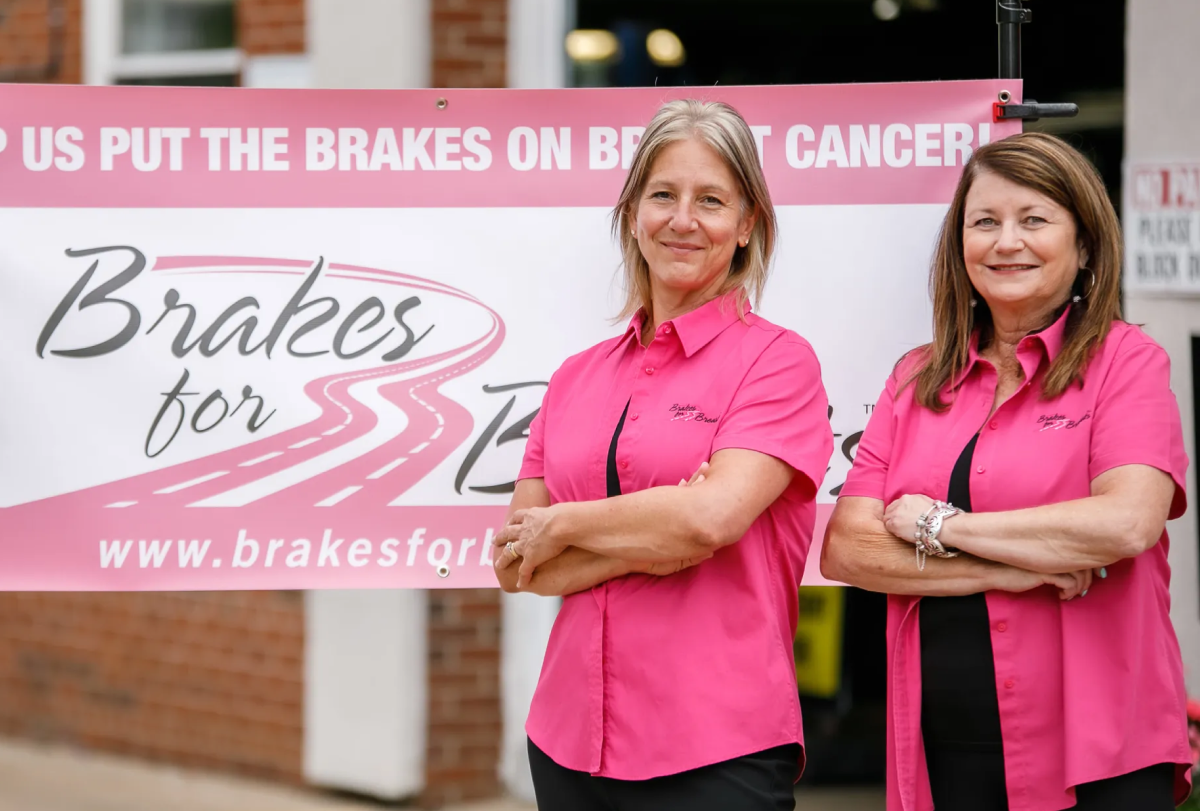
Breast cancer is the most diagnosed cancer among women in the U.S. after skin cancer. In fact, there are currently more than four million women with a history of breast cancer in the U.S. Most, if not all of us know someone who has been greatly impacted by this disease.
Founded in 2011, Brakes for Breasts unites independent auto repair shops to support people affected by breast cancer and donate to ongoing research for a cure. You may have heard the saying, “prevention is better than cure.” Brakes for Breasts takes that to the next level through the belief that “prevention is the cure.” The organization offers participating shops a chance to raise money for the Cleveland Clinic Breast Cancer Vaccine Fund, supporting the creation of a vaccine that can prevent TNBC (triple negative breast cancer).
Today, Brakes for Breasts has expanded to work with hundreds of shops nation-wide, raising more than $2.1 million. Its founders, Leigh Ann Best and Laura Frank, are both powerhouses in the auto repair industry who established Brakes for Breasts to raise money for breast cancer research and provide a bigger voice to women in the auto repair industry.
In 2024, Tekmetric donated more than $16,000 to Brakes for Breasts. This year, our goal is to donate even more – and we need your help! There are multiple ways to participate:
Sign up with Tekmetric. During the month of October, Tekmetric will donate $50 to the Brakes for Breasts campaign for every new shop that signs up for Tekmetric.
Share the campaign with your customers. If you are a TechNet shop, make sure your customers know that when they come to you for a qualifying brake service between September 1 and October 31, you are offering a rebate on qualifying brake pads that they can choose to donate to the fund.
Donate with Tekmetric's fundraising link. If you want to go straight to Brakes for Breasts without any brakes, use this link to donate any dollar amount to Brakes for Breast. You can choose between a one-time donation or a monthly contribution.
Fundraise at your shop by joining the Tekmetric team. You can register your shop to fundraise for this cause in your community through Tekmetric’s campaign at this link. The shop that raises the most money during the campaign will win a trip to join Tekmetric at the check presentation ceremony in Cleveland in April 2026.
Participate directly. Participating independent repair shops can work directly with Brakes for Breasts by offering customers free brake pads on brake jobs in the month of October, then donating 10% of the labor from that brake service to the fund.
All proceeds will go towards The Cleveland Clinic Breast Cancer Vaccine Research Fund. The end goal is to create a vaccine that can create a world free of breast cancer.
Brakes for Breasts is a tremendous opportunity for your shop to partner with your local community to benefit people affected by breast cancer. Our customer Austin Blanton, owner of Import Auto Shop, experienced this phenomenon first-hand when his shop participated in previous years: “When you’re worried about money and busy dealing with operations stuff, you can lose sight of paying it forward. For example, one of the things we did last year was get involved with Brakes for Breasts.”
As we aim to focus on our customers, we are also happy to be part of initiatives that will transform lives for generations to come. For our customers who have been impacted by this disease, the month of October honors what you have overcome to be here. By promoting further research and support of your journey, we hope to support the creation of better cancer care for all who are impacted by this disease. Let’s hit the brakes on breast cancer and work towards a cure together!
When you think about the most exciting aspects of being in the auto repair industry, it’s unlikely that the invoice and estimating process comes to mind. Drafting up invoices and getting approval on estimates can be a tedious process when all your team wants to do is get things rolling with the repair! And if you have a small team, it might be tough to find someone who can squeeze in the time to create an estimate and invoice for every single repair.
However, the auto repair invoice and estimating process is one of the most important parts of your business. By fine-tuning it, you can keep better track of repairs and sell more work, increasing your shop’s ARO.
Here are five main reasons why you should fine-tune your shop’s auto repair invoice and estimating process.
When it comes to auto repair, a great customer experience can make the difference between a customer returning for future repairs or not. At Tekmetric, we recognize the importance of creating an excellent experience for your shop’s customers that meets their expectations and keeps them returning again and again. To accomplish this, we strive to offer a solution that helps you meet four key pillars of the customer experience: convenience, comfort, trust and loyalty.
Convenience
For vehicle owners, choosing the most convenient shop is not necessarily about going to the closest shop. Rather, convenience is a matter of choosing the shop that makes their life easier.
With approximately 50% of all business shopping completed outside of regular business hours, convenience goes a long way – especially when it comes to auto repair. Customers may need to drop their vehicle off and pick it up later, rather than waiting in the lobby. They may even request to complete pick up after business hours. In all cases, convenient solutions can keep the pick-up process smooth and painless for both you and the customer.
Tekmetric’s two-way texting opens the door of convenience for vehicle owners. Two-way texting meets the customer where they are – anytime, anywhere. The vehicle owner can access updates to their repair process through a simple text, even from their office desk. Additionally, two-way texting can integrate with Tekmetric’s text-to-pay feature, so customers can pay from work or home, then come pick up the vehicle at their own convenience.
Comfort
Traditionally, we think of comfort in a physical sense. For example, we might say, “that chair is comfortable.” Customers choose who they do business with based on how comfortable of an experience they receive. Having the tools and resources that ease the tension inherent with getting a vehicle repaired is critical to making a customer feel comfortable. One example that is often overlooked is the payments experience.
With Tekmetric’s “Buy Now, Pay Later,” option, shop owners can offer vehicle owners the opportunity to complete necessary repairs and pay in installments over time. An experience like this can make vehicle repair affordable and comfortable, no matter what the customer’s budget is.
Trust
Trust between an auto repair shop and vehicle owners is paramount. Not only can it make the repair process smoother for all parties during the repair, but it also contributes to building a lasting relationship for future repairs. A customer is more likely to trust you when you have demonstrated that you can create an experience that is convenient, comfortable and transparent.
Digital vehicle inspections (DVIs) are a great opportunity to educate vehicle owners on the health of their car by providing them with recommended repairs accompanied by photos and videos. Through DVIs, technicians can offer a holistic, transparent evaluation of the customer’s vehicle by highlighting both areas in need of repair and parts that are working well. The result? Customers can gain a better understanding of the technician’s findings, making them more likely to approve work – and return for future repairs.
Loyalty
Prioritizing customer convenience, comfort and trust contributes to an enduring sense of customer loyalty. Building loyalty drives your shop’s bottom line in the long term. A good experience for one vehicle owner can lead to a domino effect within their personal network, as they return for future repairs and make referrals to others. Therein lies the hidden gem of long-standing, thriving businesses: strong customer loyalty.
One of the ways to strengthen customer loyalty is through education and clear communication. Our integration with MotoVisuals demonstrates Tekmetric’s commitment to education and clear communication by showing customers what is wrong with their vehicle instead of simply telling them. Informing vehicle owners about the health of their car accompanied with pictures and educational videos creates a dynamic that is forthcoming, honest and geared towards educating the customer while also ensuring the car gets repaired.
A customer-centric approach can drive your shop’s performance and establish an excellent customer experience. Use these four pillars – convenience, comfort, trust and loyalty – to drive your shop, and you will create a seamless experience for your customers from start to finish. Whether it’s meeting them where they are financially or educating them about a repair, you can establish a consistent, excellent experience that attracts and retains loyal customers now and far into the future.



.webp)

.svg)



.svg)

.svg)
.svg)
.svg)
.svg)
.svg)
.svg)
