It might sound simple, but it's true: smartphones and digital experiences have revolutionized the way people interact with businesses. We've all come to expect near-instant responses, simplified checkout processes, and visibility into what we're paying for.
And independent auto repair shops aren't any different. There's a unique opportunity where your business can meet customer's expectations with modern service and modern operations.
How Can You Make Your Auto Repair Shop More Modern?
We keep saying that word "modern," but what does that really mean for auto repair shops? When we step back and think about the modern independent repair shop, we could sum it up with three core concepts:
The freedom to run your business in a more contemporary way with data, industry knowledge, flexibility and independence to work as in whatever way is best for you and your shop.
The power to simplify your shop's operations can gain complete visibility, control and opportunity to determine the best path forward for every decision.
The best experience for your customers, every time, for every job, whether that's a coolant flush and pad replacement, or a turbo rebuild.
With the right tools in place, your team members won’t have to stress about extra oversight and can feel empowered to take the reins at work. And your customers can have a more active say in the repair process.
The features and capabilities found in modern repair shop software will fall into two main buckets:
Features that enable you and your team to work more efficiently
Features that enable you and your team to interact more smoothly with customers
Ultimately, the modern features we’re about to dive into will free up your time as a shop owner. Instead of stressing over small day-to-day details, you’ll be able to focus more on the high-level aspects of advancing your business.
Unlike traditional software that needs to be installed directly on your shop computer, which then needs to be maintained by that specific service provider in your shop's physical location, cloud-based software can be used on any device, from any location that has an internet connection.
With cloud software, everything is hosted on the provider's servers, but completely owned by and accessible to your shop.
Technicians can type inspection notes from their smartphones without having to leave their bays, service advisors can check on repair details, and owners can work remotely from anywhere with internet access.
And because all of your data is on the cloud, you’ll have more peace of mind that your shop won’t suffer from data loss if the hardware breaks down, and the platforms are always improving.
2. Real-Time Control with a Streamlined Shop Workflow
Just as a dashboard in a car allows drivers to see what’s going on with their vehicle, auto repair shop software acts as your shop's dashboard with a streamlined workflow. Shop owners gain total control of their business in real-time, while allowing service writers, technicians, and shop owners to see what’s coming in, what vehicle is in the garage, and what’s ready for pickup.
Because shop owners have a granular look at the status of each job at any given moment, they can gain a strategic view of everything happening in their shops.
Tekmetric also lets shop owners see the dashboard by day, week, month, and year-to-date, opening up a whole new level of forecasting with a complete view of how their business is performing over time.
3. Digital Vehicle Inspections For Enhanced Visibility
Digital vehicle inspections are an absolute game-changer for creating a modern customer experience at your shop.
Instead of handing guests a paper inspection, you can send a digital one straight to their device, where they’ll be able to read all the necessary details about the proposed repair work.
Tekmetric’s digital vehicle inspection feature helps you navigate that issue by bringing another layer of transparency to every interaction. Technicians can attach photos and videos to each DVI, so guests can see for themselves exactly what’s wrong with their cars. As a result, they’ll have peace of mind and trust your recommendations.
4. Simplified Parts and Inventory Management
Modern shop management software gives you an holistic view of everything happening in your shop for the ultimate level of management.
And successful parts management means you need to understand how your inventory is suited to the needs of your customer, the quality of the parts that are kept in the shop, and how to minimize inventory that is not being sold.
Modern shop management software makes parts and inventory management easy by combining every single aspect of running your shop, managing your inventory, and even ordering new parts into one streamlined workflow.
If you don't have a part in stock while working on a car you can quickly swap the part for a similar one in inventory, or instantly place an order for what you need and let you text the customer all the same system.
5. Instant and Digital Communication
These days, customers expect updates on the services they receive, such as shipping updates on their packages. Repairs are no exception. Customers are busy and want to know when they can expect to pick up their vehicles.
Thanks to true two-way texting, service advisors can give customers updates and even answer any questions that customers might have about their DVIs. Service advisors can update customers on the status of their repairs in seconds. They don’t have to dial a number or try to find customers in person.
Text-to-pay is touchless payment—customers can pay invoices directly from their smartphones. They don’t have to physically walk into the shop to hand over cash or a credit card.
Shops can take advantage of alternative payment methods to provide their customers with flexible service and simplify the payment process. Not only does this make it easier for your customers, but Tekmerchant even provides necessary protections to help shops prevent chargeback fraud, so you can have peace of mind knowing you will get paid for the work your shop did.
Running a Modern, Independent Auto Repair Shop
The ability for shops to track financial information, payment, and customer history will affect their success, especially as they take on new types of repairs on new types of vehicles.
As they update their repair offerings in response to new vehicles on the street, shops will need to keep a close eye on their metrics to ensure they are meeting their profit goals.
And of course, shops will have to respond to updates in consumer technology to ensure that they’re keeping their teams and customers happy.
With Tekmetric, you can modernize your shop and give your team and customers the flexibility and autonomy they want.
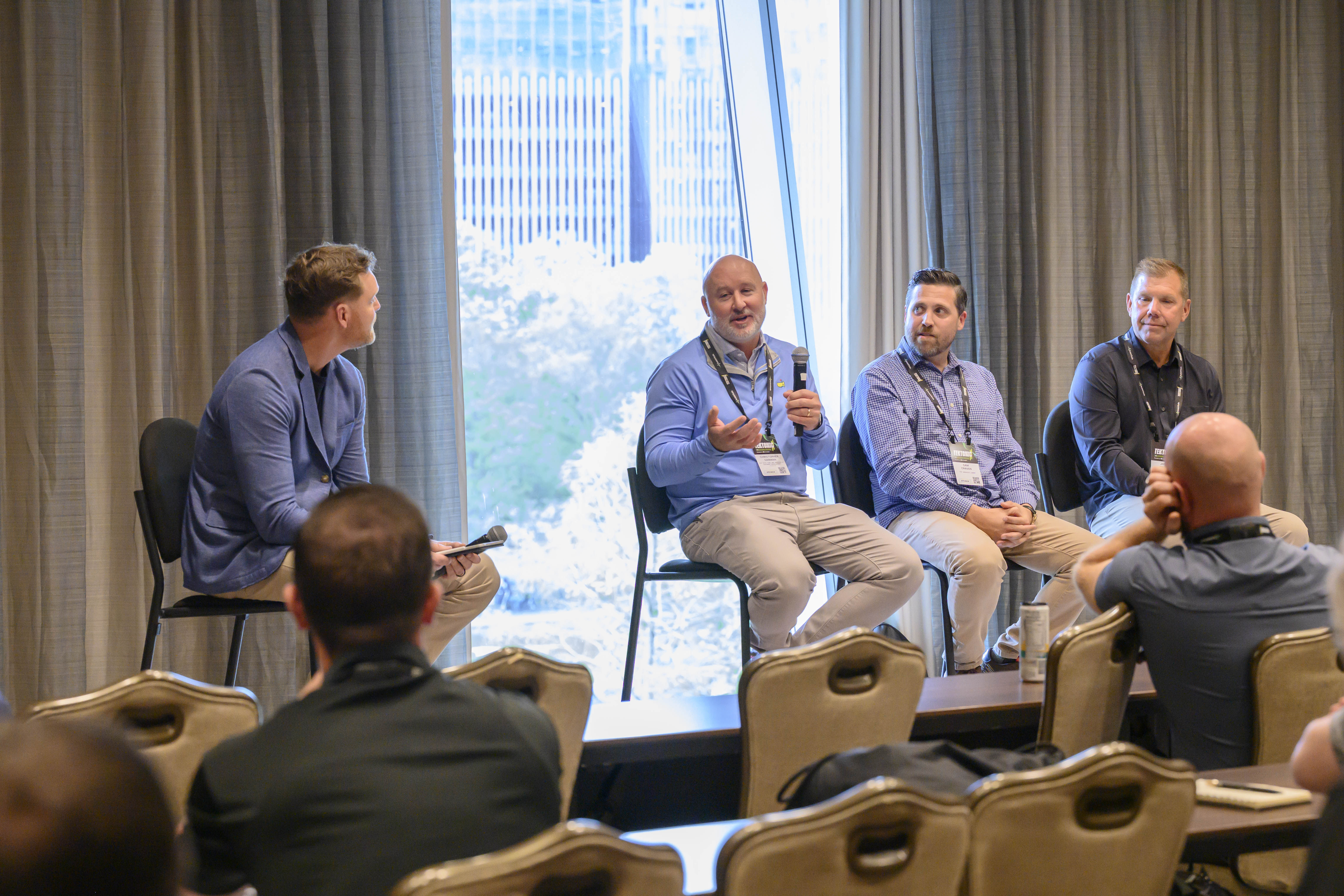
Almost 1,000 shop owners, service advisors, and technicians gathered in Houston for Tektonic 2026, Tekmetric's first industry conference. Over two days at the Marriott Marquis, attendees packed breakout rooms, traded hard-earned lessons, and heard from operators, coaches, and industry leaders who have built and scaled shops of their own.
The Question That Started It All
Tekmetric CEO and Founder Sunil Patel opened Tektonic 2026 with a question he has been asking since he was writing service tickets and mopping floors at his former Houston shop, Motorwerks of Houston: "Why does it have to be so hard? Why does it have to feel like we're fighting a war on 12 fronts?"
That question, he told the room, is the reason Tekmetric exists.
Standing in front of shop owners, service advisors, and technicians who understand that question on a cellular level, Patel walked through how much harder running a repair shop has become. Vehicles are packed with software, sensors, and calibration systems that require entirely new toolsets. Customer expectations have been shaped by on-demand everything. Technician shortages continue to press on shops across the country. And OEM data restrictions are making it harder for independent shops to do the work they were built to do.
But Patel didn't stop at the challenge. He laid out four pillars he believes the industry needs to move forward: stop celebrating burnout as a badge of honor, build genuine trust with customers and teams, invest in an ecosystem of great partners and vendors, and embrace technology that serves shops rather than extracts from them.
He closed with a simple ask for everyone in the room: be curious, be open, be generous with what you know, and be present.
"I want you to take something away from here," he said. "Something that will get you to be 1% better than you were."
That set the tone for everything that followed.
Top Takeaways
Process Consistency Wins on the Hard Days
Busy days don't create problems. They expose them. The best shops build their standard operating process before the chaos starts.
Call the day before. A preappointment call to review service history and flag overdue maintenance turns intake from reactive to planned and primes customers to say yes before they walk in the door.
Speed is your biggest sales tool. Every hour between drop-off and delivering an estimate costs roughly 10% in approval rates. Get findings to customers fast.
Set the next promise, not the finish line. Never promise a completion time you can't guarantee. Promise the next specific update and deliver it on time, every time.
The in-store customer is the highest-priority repair order in the building. Every other car can wait. The person sitting in your lobby cannot.
Improve one thing at a time. Pick one process to fix, measure it, and build accountability before moving to the next. Trying to fix everything at once fixes nothing.
Speed Closes More Jobs Than Salesmanship
Closing rates drop sharply with every hour that passes between drop-off and the customer call. A customer who has been waiting since 8 a.m. has had time to read every one-star review and talk themselves out of approving the work.
Get inspection results to customers within 30 minutes of dispatch. That's the speed zone. Everything else in the shop is secondary until that call is made.
In-store customers get findings in 15 minutes or less. The customer is sitting right there. Use it.
Relative priority is your daily compass. At any moment, the most important thing is moving the car that's furthest behind in the process. Not the loudest customer. Not the most expensive ticket. The earliest step.
Two daily goals. Full stop. Every technician runs at least eight billable hours. The shop hits its gross profit target. Nail both and everything else follows.
You Don't Have a Technician Shortage. You Have a Culture Problem.
The technician pipeline isn't as broken as it seems. What's broken is how many shops make it hard to stay.
Rethink flat rate. Hybrid pay models that combine a solid base with performance incentives align your team's goals with the shop's goals and they're far more attractive to the next generation coming into the trade.
Answer two questions before you do anything else. Why would a technician work here? Why would a customer come back? If you hesitate on either, start there.
Recognition is the highest-ROI leadership move you have. Research cited at the conference found that team members become disengaged because they don't feel seen. Fix that before you invest in anything else.
AI won't replace hospitality. Technology can handle administrative weight, but the trust a service advisor builds with a customer at the counter is irreplaceable. Invest in that skill set.
P.J. Leslie, Tekmetric's head of mid-market and enterprise sales, moderates a panel during Tektonic 2026 in which multishop owners break down the real strategies behind expansion: buying shops, building shops, systemizing operations, integrating teams, protecting culture, and planning for eventual exit or partnership.
Growing to Multiple Locations Takes More Than Money
Every multishop operator on the stage agreed: you're never fully ready, and that's fine. What matters is being profitable, having the right people, and expecting the unexpected.
Profitable and cash-positive before you move. When you make a mistake at location two—and you will—you need a healthy location to cover it.
You're ready when your shop doesn't need you. Build your bench before you open the next door. The manager for location two should already be in your building today.
Start your exit plan on day one. Almost no one in the room at one of Tektonic’s breakout sessions had a clear exit strategy. Don't leave money on the table because you never thought through how the story ends—whether that means selling, transitioning, or building for long-term cash flow.
Leadership Is the Ceiling on Everything Else
Your shop will never outperform your leadership. What you tolerate becomes your standard. How you show up on Monday morning sets the emotional temperature for everyone around you.
Know your triggers before they know you. Name what sets you off. Once you can spot it, you can stop it before it damages a relationship.
Pause for three seconds. Before you respond to anything that's gotten under your skin, stop. Three seconds is the difference between a reaction and a response.
Hear less. Listen more. After someone finishes speaking, let the silence sit. People almost always have more to say and the second thing is usually the real thing.
Walk into hard conversations knowing how you want them to end. Start with the outcome in mind, not the grievance.
Tekmetric Chief Product Officer Jared Haleck breaks down Tekmetric's new products at Tektonic 2026. The new products include Tekmetric digital ads, Smart DVI, and Tekmetric phones.
Product Announcements at Tektonic 2026
The closing session belonged to the Tekmetric product team. Drawing on data from more than 15,000 shops on the platform, Tekmetric President and COO Lauren Langston and Chief Product Officer Jared Haleck built the roadmap around key areas where winning shops consistently outperform the rest: car count, average repair order (ARO), driver experience, and cycle time.
Here's a look at what’s coming:
Tekmetric Digital Ads: AI-powered advertising on Google Maps and Search, built for the moment a driver has a problem and is ready to act. It connects directly to Tekmetric so you can see the gross profit behind every dollar of ad spend, not just clicks.
Smart DVI: Technicians walk the vehicle, narrate what they see, and Smart DVI builds the customer-ready inspection report automatically—findings organized, images annotated, and jobs pre-suggested for the estimate. Less time typing. More time turning wrenches.
Tekmetric Phones: Customer details, open repair orders, and communication history surface the moment an inbound call rings. No more looking it up while someone's waiting. A future capability in development will transcribe calls in real time and auto-populate appointment notes.
See You in 2027
Tektonic 2026 was Tekmetric's first industry conference, and it delivered on the promise Sunil Patel made from the stage: a room full of shop owners, service advisors, and technicians who showed up to get better.
The through-line across every session was the same. The shops that win are the ones that build systems, invest in their people, and keep getting 1% better. Not all at once. One thing at a time.
G2 gathers the reviews and opinions of real Tekmetric customers and compares them with competitors in the auto repair shop software industry. Awards are based on metrics such as usability, results, and other factors.
For Fall 2025, G2 has awarded Tekmetric with a range of badges, including Momentum Leader, Best Results, Best Usability, Best Realtionship, Most Implementable, and Grid Leader.
These awards reflect our customers' experiences and trust in Tekmetric, highlighting their role in our success.
What These Badges Mean
Momentum Leader: We're leading the pack, constantly evolving to meet the ever-changing needs of the automotive industry.
Best Results & Best Usability: Tekmetric is designed to be intuitive and user-friendly, helping you achieve the results you want.
Most Implementable: Change can be scary – That's why we've made it easy to get started and integrate with Tekmetric so you can hit the ground running.
Grid Leader: This badge showcases how our customers describe Tekmetric as the go-to solution for auto shop management.
Best Relationship: Tekmetric has always been focused on creating a positive experience and relationship with our customers.
Thank You to Our Customers
We couldn't have done it without our customers! Your feedback and support drive us to continually improve and deliver the best possible shop management experience. We're excited to continue this journey with you and can't wait to see what we accomplish together in the future. We'll continue to innovate, listen to your feedback, and provide the tools you need to run your shop.
When it comes to automotive repair, a strong reputation and reliable service are undoubtedly key. But even the best mechanics can benefit from a classic, often-overlooked tool: the business card. In a digital age, you might think these small pieces of stationery are obsolete, but for automotive professionals, they remain a powerful and tangible marketing asset.
The Importance of Business Cards for Mechanics
In the fast-paced world of car repair, a memorable impression can make all the difference. While digital marketing has its place, a physical business card provides a direct and immediate connection.
Auto repair business cards are more than just contact information; they're a miniature billboard for your brand. They convey professionalism and demonstrate that you're prepared and serious about your work. They also serve as a constant reminder of your services, keeping your shop top-of-mind long after an initial interaction. Think of them as a portable advertisement that can be tucked into a wallet, glove compartment, or on a refrigerator, ensuring your contact details are readily available when a customer needs them most.
Beyond initial customer acquisition, automotive business cards can play a crucial role in customer retention. Many shops use them as a simple way to provide their phone number and address, but they can also be integrated into loyalty programs or used to promote new products or services. They are a professional touchpoint that reinforces your brand identity and solidifies trust.
Best Practices for Designing an Automotive Business Card
Designing an effective automotive business card requires a blend of aesthetics and practicality. It's not just about looking good; it's about being functional and memorable.
Brand identity: Does your shop specialize in general automotive repair, or do you focus on specific services like tires or diagnostics? Your business card design should reflect this. If you're known for cutting-edge technology, a more modern and sleek design might be more appropriate.
Quality is king: A flimsy, poorly printed card immediately sends the wrong message. Invest in high-quality cardstock with a professional finish, such as matte or gloss. Metal business cards are becoming more popular and offer a way to stand out. Utilize full-color designs that match your branding.
Simplicity is key: While it might be tempting to cram every service you offer onto your card, resist the urge. An overcrowded card is difficult to read and less impactful. Prioritize essential information and leave plenty of white space.
Stay unique: In a sea of generic business card templates, what will make your car business card stand out? Perhaps a unique shape, a subtle texture, or a clever use of imagery related to your specific automotive repair niche. Don't be afraid to be creative, but always keep clarity and readability in mind.
Utilize both sides: Remember that you have two sides of the business card to work with. Typically, the front is best for contact information, and the back can be a call to action or QR code.
Key Elements to Include in Your Automotive Business Card
A well-designed automotive business card is more than just a pretty face; it's a functional tool that provides all the necessary information for a customer to connect with you. Here are the essential elements to include:
Your Shop's Logo and Name: This is your primary brand identifier. Your logo should be clear and recognizable, and your shop's name should be prominently displayed.
Your Name and Title: While not strictly necessary for every card, including the owner's or a key auto mechanic's name and title adds a personal touch.
Contact Information: This is arguably the most crucial element. Include your phone number, email address, and your physical address. Make sure these are easy to read and accurate.
Website Address: In today's digital world, a strong online presence is vital. Include your website URL so customers can easily learn more about your services, read testimonials, or even schedule appointments online.
Services Offered: You don't need a comprehensive list, but a few key services can help customers understand your specialty. For example, "Engine Diagnostics," "Brake Service," or "Oil Change."
Call to Action: While not always a direct call to action, you can subtly encourage action. For example, if you offer warranties, you might mention "Backed by our 12-month warranty."
QR Code: This is a modern and highly effective addition. A QR code can link directly to your website, online scheduling system, or a map to your shop. This makes it incredibly convenient for customers to access more information without having to manually type in URLs.
Beyond these essentials, consider adding a tagline that encapsulates your brand's unique selling proposition. For instance, "Your Trusted Partner in Automotive Care" or "Quality Repairs, Unbeatable Service." Some shops even include a small area for appointment reminders on the back, transforming the card into a dual-purpose tool.
Mechanic business card templates
To help you get started with your business card design, we have included some inspiration below.
Auto repair business card ideas
Tire shop business card ideas
Mobile mechanic business card ideas
Which Software is Best for Designing Business Cards?
You don't need to be a graphic designer to create professional-looking automotive business cards. Several software options, ranging from beginner-friendly to professional-grade, can help you bring your vision to life.
For those on a budget or looking for a quick solution, online business card templates from platforms like Canva, Vistaprint, or Zazzle are excellent choices. These platforms offer a vast library of pre-designed business card templates specifically for the automotive industry. They provide intuitive drag-and-drop interfaces, making it easy to customize text, colors, and even upload your logo. They often integrate directly with printing services, simplifying the entire workflow.
For more advanced users who want complete control over their business card design, professional graphic design software like Adobe Illustrator or Adobe Photoshop are the industry standards. These programs offer unparalleled flexibility and precision, allowing you to create truly custom designs from scratch. However, they come with a steeper learning curve and a subscription cost.
Regardless of the software you choose, ensure it allows you to export your design in a high-quality format suitable for professional printing, often a vector file (like AI, EPS, or PDF) or a high-resolution JPG/PNG.
Final thoughts
In an increasingly digital world, the humble business card for an automotive repair shop remains a powerful and tangible marketing tool. It's not just about sharing contact information; it's about making a lasting impression, reinforcing your brand, and fostering trust with your customers.
By adhering to best practices for designing an automotive business card, including all key elements, and leveraging the right software, you can create a mechanic business card that truly represents the quality and professionalism of your shop. Whether you're a seasoned auto mechanic or just starting an auto repair business, don't underestimate the power of a well-designed, high-quality business card.




.png)


.png)


.svg)



.svg)

.svg)
.svg)
.svg)
.svg)
.svg)
.svg)
