Well-written mechanic work orders help technicians stay on task and efficiently move jobs through to completion. With Tekmetric’s Job Board, mechanic work order templates, and Tech Board, you can craft and manage highly detailed work orders, strategically assign work, and track progress all from one intuitive shop management software.
If you're a service advisor, you probably know the ropes of preparing a work order like the back of your hand: you get the technician to perform an inspection, put together an estimate, get approval for the work, and then prompt the techs to complete the work. And if you’ve read our digital vehicle inspection guide, you know that Tekmetric makes drawing up mechanic work orders that much easier. But what happens when it’s time to assign work, and it seems like all the technicians are already stacked with jobs?
Without the right tools, assigning work evenly across your team of technicians can come with a serious learning curve. Fortunately, Tekmetric can simplify work order creation and job distribution, too. Small details and adjustments intentionally designed into our system can make a big difference in how efficiently the work is completed.
Technicians and service advisors, you know the pace and organization of a shop depends on the efficiency of its work order process. If you don’t know what to do, what to use, and how long you have to complete a job, it’s difficult to fix a car and get it back to the customer on time. And as your shop scales to take on more work, the management challenge increases exponentially. So let’s dive into how to streamline mechanic work orders and get more work done without it seeming like, well, work.
Evenly Distributed Workloads For a More Efficient Workplace
Imagine it’s summer and you come in one sweltering day to a slammed schedule and not enough help. Juggling all that work can be challenging enough with an evenly distributed workload, but when the workload isn’t balanced, work can become downright frustrating.
It can also mean turning away customers.
Ultimately, it’s impossible to sustain and grow a business if keeping up is a struggle and panic sets in when a sudden influx of jobs comes through the shop. Changing up how work orders are drawn up and issued can make a big difference and turn a chaotic workplace into an efficient one.
In a well-balanced workplace, technicians tend to be happier and more efficient at their jobs. The quality of their work goes up, leading to more satisfied customers. Everyone is safer in a well-balanced workplace, too, as they are not constantly required to rush to finish their jobs.
Contrast our example of a garage in chaos with one where each technician knows exactly what tasks are on their plate and how many hours they need to get in, or have left, on a particular job. Now imagine that they also have an easy way to track and communicate their progress to the rest of the team.
With Tekmetric’s work order tools, you can fine-tune your team’s timing and bring order back to your shop.
Generating a Mechanic Work Order on Tekmetric’s Job Board
Exploring the Job Board
Service advisors, get ready to meet your new command center: Tekmetric’s Job Board. The Job Board provides a launching point for creating new work orders and integrates with other aspects of managing mechanic work orders. The Job Board lets you see work order cards under Estimates, Work-In-Progress, and Completed jobs columns. Each job card displayed shows the customer’s name, car description, and estimate.
You can initiate a new work order by clicking “CREATE REPAIR ORDER'' in the upper-right corner of the Job Board. Creating a new repair order will pull up a new repair order form where you can record the details of the new work order. If you’re helping out a customer that has already been in the shop, you can search the customer by name, plate, VIN, email, or phone number to quickly populate their information. If they are a new customer, simply click “ADD NEW CUSTOMER” and gather their information to save into the system.
Inside Tekmetric Mechanic Work Orders
Every new work order starts with an estimate. Service advisors and technicians can collaborate within Tekmetric, leveraging Digital Vehicle Inspections to capture even the most minute details about the vehicle and the reason it's in the shop. Parts and labor time needed can also be documented. If you’re a service advisor, Tekmetric will prompt you to provide details on each job needed for the work order, including labor hours required and a cost-estimate based on what the techs find.
With Tekmetric’s Repair Orders, which function like digital mechanic work order forms, you can say goodbye to the days of guestimates and incomplete work orders. From within the work order, you can send estimates and information to the customer for approval. Once an estimate is approved by the customer, you can begin distributing jobs within a work order to different technicians You’ll also have easy access to car and customer history from each work order.
Tips for writing a useful work order
Be sure to read through the customer’s history and highlight any important details in your notes. In the auto repair world, customer care is just as important as caring for the car itself.
Don’t be afraid to add details to the automotive repair work order template once a job starts. The more information technicians have access to, the better.
Think of the repair order (or digital mechanic work order) as another tool in your toolbox. It’s only useful if you know how to use it. Make sure everyone on your team is trained to use the work order feature.
Write for your audience. If you’re a service advisor, remember that technicians aren’t mind readers, so your shorthand or abbreviations may not make sense to them. The same goes for customers reading your estimates and digital vehicle inspections.
Technicians and Service Advisors—Meet Your New Best Friend: Tekmetric’s Tech Board
If the Job Board is where the work is estimated and tracked, the Tech Board is where the work is divided and completed. Switching to the Tech Board from the Job Board is simple: the icon for Tekmetric’s Tech Board is found directly below the Job Board on the left navigation panel.
Think of the Tech Board as your team’s digital playboard. The Tech Board is a place for everyone to come together and strategize.
If you’re a service advisor or shop foreman, you will act as an account administrator to assign and arrange tasks by job and team member and choose whose accounts to show on the Tech Board at any given time. If you choose to give viewing access to all technicians, your whole team will be able to view all the work assigned across the shop, or you can adjust Tekmetric’s settings to only show each individual their own task list when they login.
Technicians, the Tech Board will let you see exactly what is on your plate at a glance and how many hours you need to put in. It will also show you exactly what jobs to prioritize.
Orienting Workloads with the Tech Board
The Tech Board displays mechanic work order cards divided by columns according to their assignment status. The first column to the left of the interface displays No Tech Assigned jobs, and technicians are represented by separate columns to the right. Each column representing a technician also shows Assigned, Complete, and Incomplete hours, and displays any assigned work order cards. Each card shown on the screen displays information about the customer, the vehicle, and the promised completion date, time, and hours for the work order.
If you’re the service advisor, the wrench in the lower right corner of each card allows you to assign specific jobs within the work order to the technician of your choice. You can assign all of the jobs to one technician or divide the jobs within the work order between multiple techs by clicking the wrench, hovering over individual jobs within the work order, and then clicking on technicians’ names for each job listed.
When you distribute jobs within a work order between multiple technicians, a purple split-arrow icon will appear in the upper left corner of the work order card to indicate multiple technicians are assigned. You can hover over the purple icon to view the names of the technicians assigned to the work order. You can also monitor how many hours a coworker has completed for a specific work order by checking the hours listed at the bottom of each mechanic work order card.
Want to prioritize one job over another? Simply drag and drop the mechanic work order card in question to the top of the column.
The Tech Board integrates seamlessly with the rest of the Tekmetric shop management system as changes made within the Tech Board are automatically reflected across the entire system. Need to make changes to a Repair Order while working from the Tech Board? Just click on the work order card in the Tech Board to open the full repair order.
Tips for Efficiently Distributing Mechanic Work Orders
A poorly balanced workflow introduces unnecessary stress in a workplace. Finding balance with Tekmetric’s Tech Board can help you alleviate stress and streamline the flow of work.
Here are our seven tips for leveraging the Tech Board to create an efficient, well-balanced work environment:
Adjust account settings so that everyone on the team can see who is working what job. This increases transparency and trust and reduces resentment between workers.
Split up jobs within a work order between technicians to provide natural breaks in their day.
Remember that you can always reassign a job or an entire work order. If one technician has a lot of work on their plate, and is nearing a deadline, pull other technicians in to assist by assigning incomplete jobs to any available (or less busy) techs.
Adjust your Tech Board settings to temporarily hide technicians who are on vacation or out sick. This will make seeing who is available to work much easier.
Save time by using the search feature to quickly display who is working on a specific job.
Use the Tech Board in group meetings to strategize and analyze performance. You can also run a variety of reports, from financial to employee to customer and parts reports.
The Tekmetric Difference
Tekmetric’s Tech Board and automotive repair work order templates are designed specifically for the automotive industry and are uniquely suited to help shops stay organized and on task. We are constantly adding new features, too, making life easier for service advisors and technicians like you.
We know your team works hard to get the job done right, and with Tekmetric, you’ll be able to comprehensively document and track mechanic work order details to see repairs through to completion faster than ever, whether you’re logging in from a laptop, tablet, or your phone.
Best of all, our customer service team is always available to help!
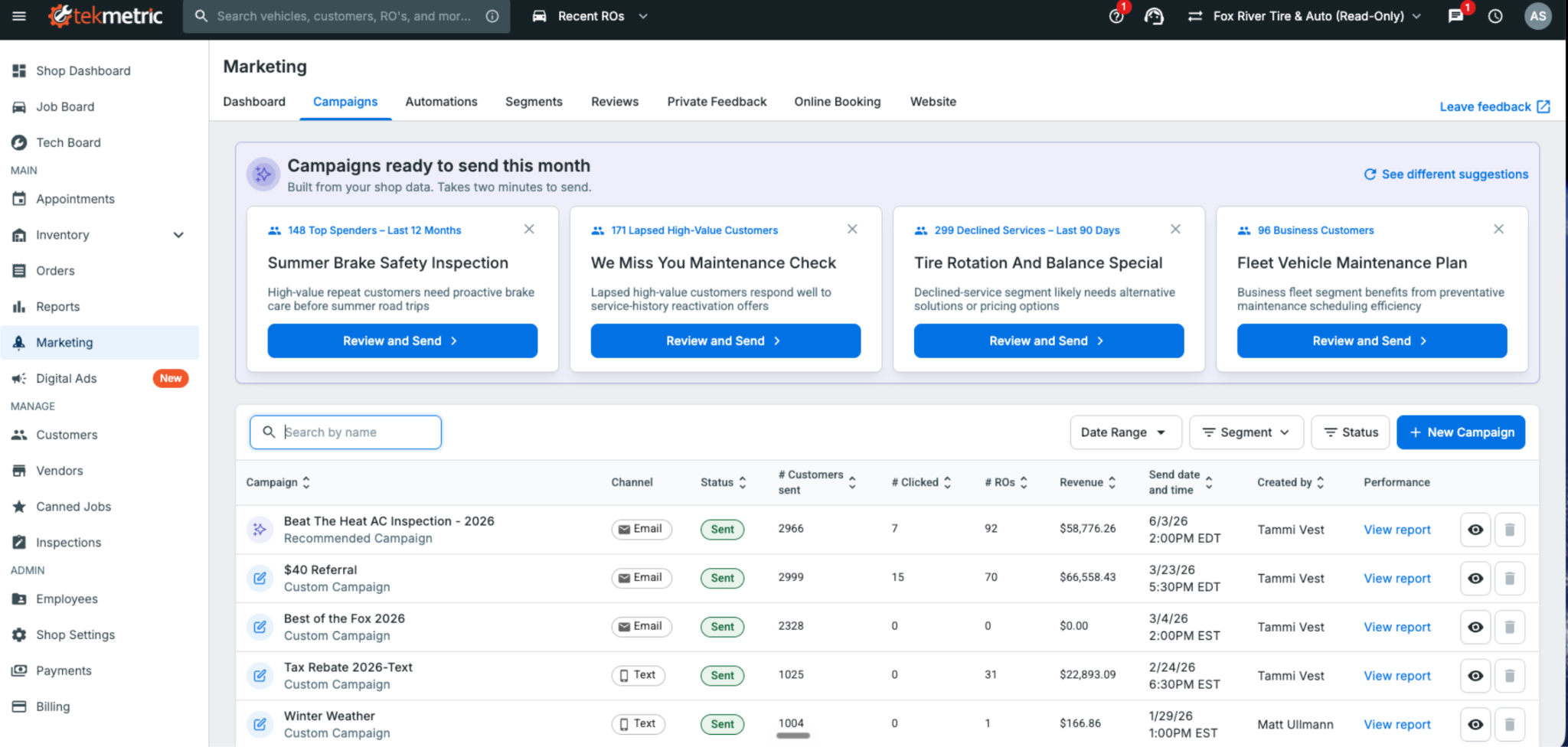
Tekmetric Marketing now builds ready-to-send campaigns. The message is written and the audience is selected. All that's left is to review, personalize, and send.
Most shop owners know the fastest way to fill this week’s bays is by bringing back customers who already trust them — the ones whose vehicles you serviced months ago but haven’t seen since. Re-engaging existing customers is one of the most effective ways to generate new repair orders.
The problem is finding the time to do it. Figuring out what to send, who to send it to, and when to send it almost always loses out to the car on the lift or the customer standing at the front counter
That's where Tekmetric Marketing's Recommended Campaigns come in.
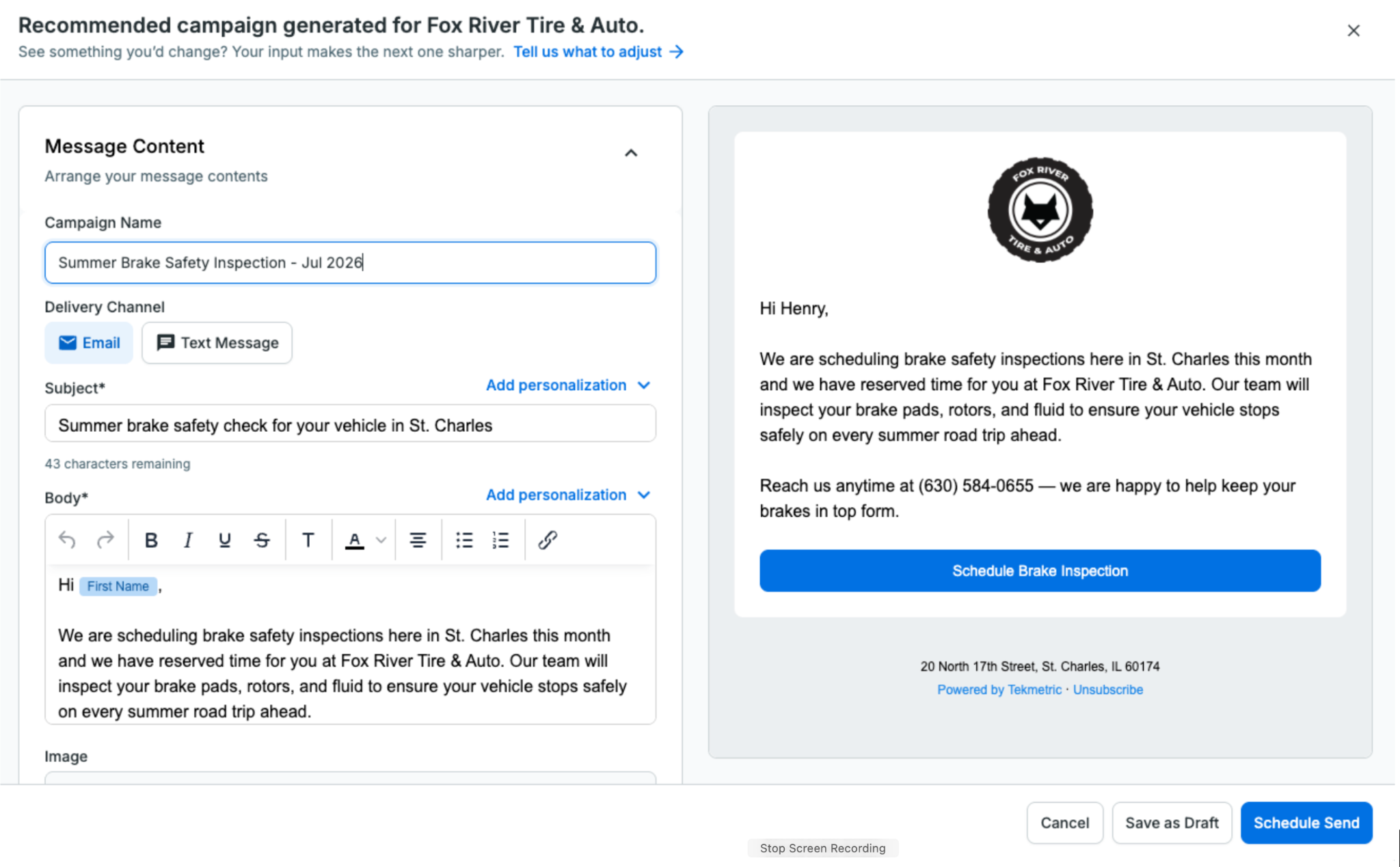
Instead of starting with a blank page, Tekmetric Marketing does the heavy lifting for you. It analyzes your shop’s data and recommends campaigns that are ready to go. The audience is selected, the message is drafted, and all that’s left is for you to review it, make any changes you’d like, and send.
No blank screen. No guesswork.
Just a campaign ready to help bring customers back.
How It Works
Recommended Campaigns automatically surfaces ready-to-send campaigns tailored to your shop using the information Tekmetric already knows — your customers, previous campaigns, location, and seasonality.
You’re always in control.
Review the recommendation, personalize the message so it sounds like your shop, adjust the audience if you’d like, choose when to send it, and you’re done.
What used to take an hour staring at a blank screen can now be done in just a few clicks.
How Fox River Tire & Auto Uses Recommended Campaigns
Like most shops, Fox River Tire & Auto in St. Charles, Illinois, wants to stay connected with customers and bring them back when the time is right. But deciding what campaign to send, then building it from scratch, takes time most shops don't have.
Recommended Campaigns gives Tammi and her team a starting point instead of a blank page. They review the recommendations, edit the suggested content to fit their brand, and send with confidence.
"Recommended Campaigns provide an excellent launchpad for re-engaging with our customers. Instead of starting from scratch, we refine the suggested content to fit our brand and send it with confidence. The process is straightforward, time-saving, and always delivers."
— Tammi Vest, Business Manager, Fox River Tire & Auto
From Reports to Results
Recommended Campaigns is part of a much bigger shift in where Tekmetric Marketing is headed.
For years, marketing platforms have been good at showing you what already happened: campaign reports, open rates, clicks, and dashboards. That’s valuable, but it still leaves the work on you.
Tekmetric Marketing is evolving beyond reporting. Increasingly, it’s helping you decide what to do next, and doing more of the work for you.
You’ve already seen this with Recommended Review Responses. When a customer leaves a Google review, Tekmetric drafts a thoughtful response for you to review and approve.
Recommended Campaigns is the next step.
Instead of simply telling you that you should market to your customers more often, Tekmetric Marketing puts a campaign directly in front of you — already drafted, targeted, and ready to send.
Your marketing should keep working even while you’re heads-down under a hood.
One Year of Continuous Innovation
Since launching Tekmetric Marketing in the fall of 2025, thousands of shops have made it part of how they attract new customers and bring existing ones back.
We’ve also continued investing in the platform based on feedback from shops like yours.
Recent additions include:
Rich text and custom links in every email so you can create more engaging emails and link directly to booking pages, review sites, and promotions. Bold a headline, organize services into a list, and drop in links to your booking page, review site, or a promotion, in both campaigns and automated emails like review requests and service reminders.
Recurring blocks for your calendar for lunch breaks, holidays, staff meetings, and other recurring events. Easily add recurring lunch blocks, staff meetings or holidays to your calendar with a few clicks. No more appointments booked over your team events without you knowing.
Smarter marketing-source tracking on appointments and ROs: Automatically associate appointments and repair orders with the latest marketing campaign or automation that reached the customer. When a customer books after getting a message, the marketing source pre-fills with the most recent campaign or automation sent to them, so attribution is accurate without the guesswork.
Recommended Review Responses, helping you respond to Google reviews in just a few clicks.
Every one of these improvements started with feedback from shop owners looking for simpler, smarter ways to grow their business.
Keep it coming.
Already using Tekmetric Marketing?
Head to Marketing → Campaigns to see what's recommended for your shop and send your first campaign in just a few clicks.
New to Tekmetric Marketing?
See how Tekmetric Marketing helps shops bring customers back with online booking, automated reminders, review generation, and Recommended Campaigns.
If you take away anything this month, it's that the Tekmetric Mobile app is now yours! We’re thrilled to have launched this across iOS and Android to make your techs’ lives easier, cutting their inspection time in half. As well, it delivers increased customer trust, ultimately driving up your bottom line.
Other top release highlights include improving the efficiency of Smart Jobs, adding fresh permission settings for increased financial control, speeding up the process of finding parts across your inventory, and making the 10DLC registration process simpler.
If you’re using Tekmessage, please complete your 10DLC registration ASAP.
Starting December 1st, this requirement will be enforced.
Save Time and Drive More Revenue With The Tekmetric Mobile App
Perform inspections from any mobile device, complete with photos and videos, building customer trust and increasing job approval. Tekmetric customers using it today have seen their inspection times cut in half. As well, shops that share digital vehicle inspections (DVIs) with their customers, see an average increase of $15k in revenue per month. With real-time synchronization your team stays coordinated, whether they're under a vehicle or discussing repairs with customers at the front desk.
Minimize the impact of time consuming tasks with these enhancements to our Smart Jobs feature.
Have you ever built a job using Smart Jobs, only to realize you accidentally selected the wrong part? Now you can instantly search PartsTech again without leaving your current job screen - ensuring you always quote the right part at the right price for your customer.
Oil changes are a necessary maintenance to keep any car running. So, it’s no wonder that repair shops offer oil change promotions to get new customers in the door. These promotions are usually for the standard 5 quarts, but what happens when a customer’s car requires extra oil? Smart Jobs will automatically calculate the adjusted price for the extra oil and add it to the estimate. This means no more hassling with a calculator to calculate the additional price tag. Smart jobs will simply provide clear and accurate estimates every time.
Starting December 1st, 10DLC registration will be required for all businesses using 10 digit phone numbers for application-to-person (A2P) messaging. This requirement will impact all customers using Tekmessage. So, we’ve made it easy for you to complete this registration in-platform. This process should take no more than 10 minutes and can be done from the Tekmessage Integration Card on the integrations page.
To ensure your service is not interrupted, please be sure to check your status and complete your enrollment ASAP. The approval process typically takes 2 to 3 weeks. Learn more about 10DLC and how to do this here.
Ensuring shop fees are consistent across all of your locations is critical, especially for maintaining customer trust. This process is now easier than ever to manage using the Multi-Shop dashboard. You can create new fees, edit existing fees, and delete fees across all of your locations. Need to maintain shop-specific pricing? No problem. Individual shops can manage their unique pricing details without impacting universal pricing.
Who’s this for?: All customers with the Multi-Shop add-on.
We heard you when it comes to wanting more control over your finances in Tekmetric, especially for those with lots of employees accessing the platform. Within the payments permission, there’s a new sub-permission for engaging with accounts receivable. By checking this box, the employee will have the ability to send repair orders to accounts receivable.
Tip: This will default to “on” for newly created shop owners and shop admins. If you had employees with the payments permission “on” at the time of the release (10/28/24), this sub-permission was defaulted to “on”.
View Inventory Across All Your Locations From One Place
Locating parts across your network can be extremely cumbersome, especially if you have to hop in and out of shop views. Your Multi-Shop account now brings inventory from all your locations into a single view, saving you time & getting your team back to work quickly. Filter by shop, status, and part type to find what you need in a snap.
Who’s this for?: All customers who have the Multi-Shop add on.
Abruptly shifting from task-to-task a handful of times throughout the day can disrupt your workflow and distract you from spending time with customers. And let’s face it: we’re all prone to tunnel vision when we’re focused on mundane tasks that can probably be automated for us.
For the shop owners and service advisors who have been in the game for a while now, it’s likely you already have your shop’s tedious functions down, but you may still have a major opportunity to save time. And for those of you who are new to the game—whether you just started your shop or are in the process of getting things up and running—you might have clicked on this blog to find your solution to your shop’s auto repair receipts. There are many auto repair receipt options out there. You could get a template or use a basic PDF. But the modern customer experience can be met with a shop management system that has a receipt process built into it.
Changing even a small procedure in your shop can have a big impact. Streamlining your auto repair receipts, for example, can save your shop time, enhance your shop’s customer experience, and even boost transparency within your shop. Let’s say your shop takes about five minutes to fill out one receipt manually. So if you have about 25 repairs in a day, that five minutes adds up to around two hours a day—simply filling out receipts. You shouldn’t have to spend time rewriting the same information over and over. The same information that you’ve already plugged in during the estimate process should automatically go into the receipt for you.
But when it comes to receipts, you can’t just cut corners to save on time. You need to make sure you include all requirements on an auto repair receipt—at minimum. Let’s take a look.





.svg)



.svg)

.svg)
.svg)
.svg)
.svg)
.svg)
.svg)
